
Figures for papers and theses
Crisp, vector scenario figures for AD and ADAS papers
that embed
cleanly in LaTeX, slide decks, and Markdown — exported as
.drawtonomy.svg (drawtonomy’s native, re-editable SVG
format), PDF, or EPS.
drawtonomy is a free, browser-based whiteboard for driving scenarios — autonomous driving (AD), self-driving, and ADAS alike.
Place lanes, intersections, vehicles, pedestrians, traffic lights, and road markings as first-class shapes. No install, no account, nothing uploaded.
But the scene you draw is not the end of the road. In Scenario mode the same canvas becomes an OpenSCENARIO authoring tool: give the actors phases, events, and triggers, then press play and watch the run execute in the browser on esmini compiled to WebAssembly, with a PASS / FAIL verdict at the end. Authoring and running OpenSCENARIO is a pillar of its own, not a bridge out.
The genuine bridges are the ones that carry a scene sideways into a neighbouring toolchain: export to ASAM OpenDRIVE 1.8 and import Lanelet2 OSM maps and ROS occupancy grids (see Bridges to your simulation and mapping stack below).
It also works where the scenarios already are. Most .xosc files live
in a Git repository, so the
drawtonomy for GitHub & GitLab Chrome
extension plays them in place on github.com — read a scenario, or page
through a whole folder of them, without cloning the repository or
installing a simulator.
The two are one pipeline, not separate products. The lanes, actors, and geometry you draw in the scene become the road network and entities the scenario plays on. No export step in between, no second tool.
The scene is a canvas that already knows the driving vocabulary. A generic drawing tool has no idea what a lane is, so every small move means rebuilding the road geometry; drawtonomy treats lanes and intersections as shapes, so the drawing survives repeated edits. The same canvas covers the figure for a paper, the slide before a design review, and the corner case you sketch on a call. When you need an equation next to it, the Math (LaTeX) tool puts a cost function or a controller equation right on the canvas.
The scenario is what makes that scene move. Give the actors phases, events, and triggers — or hand it to AI scenario generation. Draw a lane, place two cars, and type “Vehicle2 cuts in front of Vehicle1.”: the storyboard is written for you, executed in esmini, and only applied if it passes. It is an ordinary scenario afterwards, so you can seek, edit, and export it like any other.
Before you write anything, watch one run.
Play a real scenario from the esmini repository right now
— one click fetches the .xosc from GitHub and runs it in your
browser. See Open and play a .xosc.
You can also apply a planner to the ego and replay the result of a scenario test. Here is a reactive planner cut-in replay with candidate trajectories — turn on Candidates in the transport bar to see the 20 feasible and 10 rejected trajectories evaluated in each replanning cycle. The chosen trajectory drives the ego and plays in 3D too. To inspect the official checker result, use the matching CommonRoad solution and verdict:
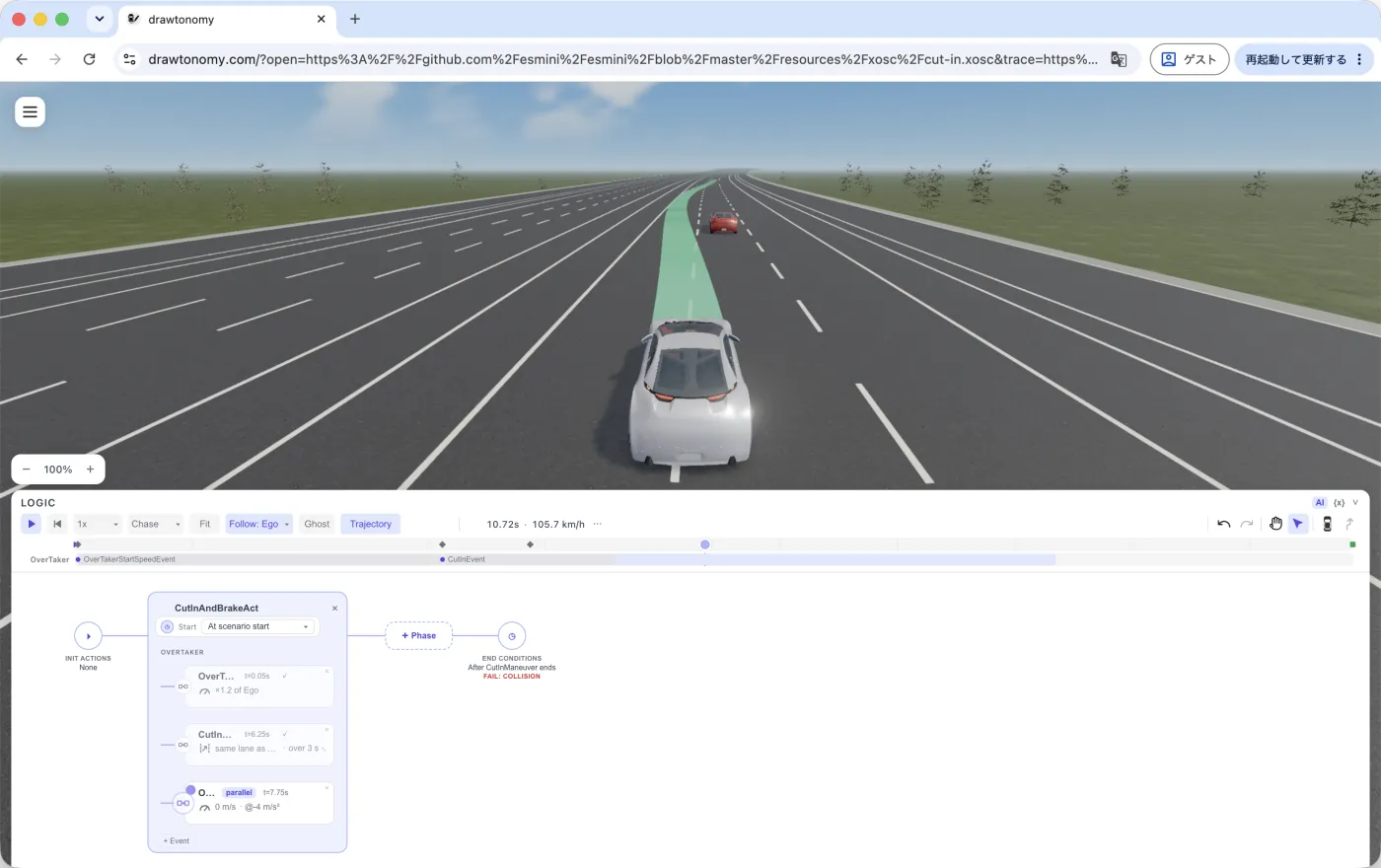
See 3D view.
Test results can live next to the scenarios, too. Keep requirements, test cases, and results as files, and open them in drawtonomy to see where each version passes or fails and replay any run. Open the example AEB test suite:
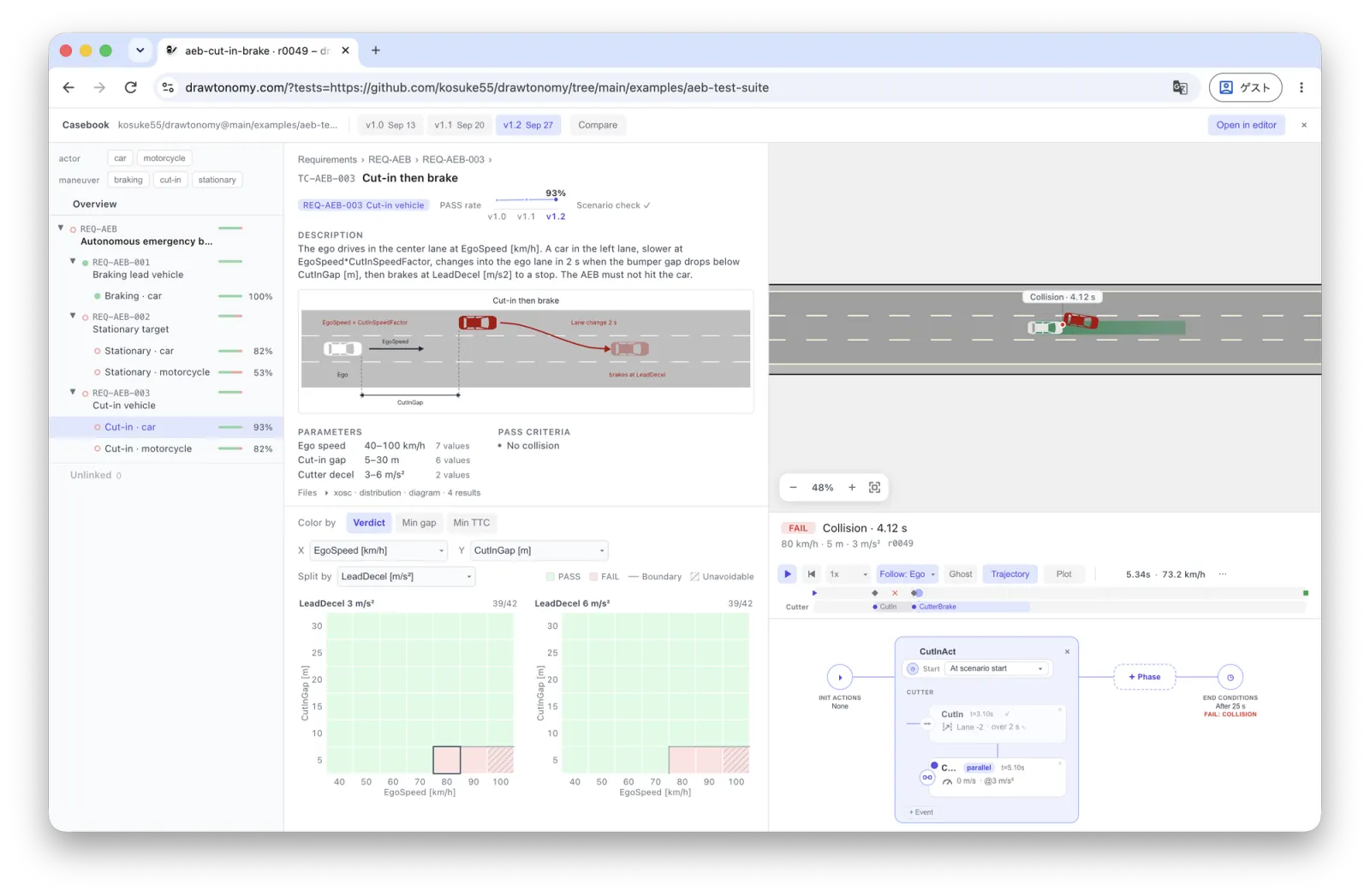
See Test management.
The lane, vehicle, and intersection vocabulary travels well beyond AD work — driving-school material, traffic-engineering diagrams, and quick road sketches all fit. The full list is on Use cases.
The whiteboard is the main thing, but the same canvas also doubles as a lightweight, browser-based front-end for these adjacent jobs:
Pick the entry point that matches what you came here for.
Figures for papers and theses
Crisp, vector scenario figures for AD and ADAS papers
that embed
cleanly in LaTeX, slide decks, and Markdown — exported as
.drawtonomy.svg (drawtonomy’s native, re-editable SVG
format), PDF, or EPS.
Diagrams for design discussion
Sketch a lane-change manoeuvre, an unprotected left, or an occlusion case in seconds. Share the result and pick up the discussion in the same canvas tomorrow.
Scenario sketches before authoring
Draw the scene before writing the OpenSCENARIO XML — and
export to .xosc / .xodr when the sketch is ready.
Map and ROS annotation
Trace lanes over a satellite background, edit Lanelet2 OSM maps, or annotate a ROS occupancy grid with paths and obstacles.
Driving-domain shapes
Lanes, intersections, crosswalks, traffic lights, road markings, vehicles, and pedestrians come built in. You can also add your own SVG templates and contribute them by PR.
Topology-aware lanes
Each lane carries Next / Previous / Left / Right connections. Two lanes that share a boundary share the same boundary points, so dragging once moves both.
Infinite canvas, satellite backgrounds
An infinite canvas for driving scenarios — pan and zoom across arbitrarily large layouts. Drop in a satellite or roadmap background and trace from a real location. Snap and shared points keep geometry aligned without manual cleanup.
Free and browser-only
No install, no account, no upload. Reopen a saved drawtonomy.svg later and the scene comes back exactly as you left it, connections and overlap relationships included.
The whiteboard is the main thing; these are how the diagram flows out to the rest of the workflow.
Re-editable SVG for papers and slides
The .drawtonomy.svg format is a regular SVG that
previews in browsers, GitHub, and slide decks, and
reopens in drawtonomy with every connection intact. The
default to reach for whenever a figure might need editing
later — papers, slides, documentation, blog posts.
Lanelet2 round-trip
Open Lanelet2 OSM maps for editing and export back to OSM — including Autoware sample maps and their regulatory elements. Useful for sketching changes against an existing HD map.
ASAM OpenDRIVE round-trip
Open OpenDRIVE .xodr maps,
edit lanes and connections visually, and export OpenDRIVE
1.8 + OpenSCENARIO 1.2 — together as an
esmini-ready zip. Roads
you don’t touch round-trip verbatim through carry-through.
OpenDRIVE ⇄ Lanelet2 bridge
Both formats land in the same internal lane model, so drawtonomy works as a browser bridge between OpenDRIVE and Lanelet2: import one, edit visually, export the other. Lanes, junctions, and regulatory elements (signals, signs, right-of-way) convert in both directions.
Once the evaluation phase is done and you actually want to draw, the docs are organised around four kinds of need. Pick the one that matches what you’re trying to do.
If you want to build on top of drawtonomy rather than only use it, see Extending drawtonomy. The SDK source, examples, and reference live alongside this site at github.com/kosuke55/drawtonomy.