
Export to OpenDRIVE / OpenSCENARIO / esmini
drawtonomy turns a hand-drawn scene into an ASAM
OpenDRIVE (.xodr)
road network plus an
OpenSCENARIO (.xosc)
scenario, bundled into a single zip you can replay in
esmini.
The conversion is intentionally basic — it covers the few shapes that map cleanly onto the ASAM data model and leaves everything else out. This page documents exactly what is converted, what the exported vehicle actually does, and what is out of scope, so the output never over-promises.
Watch the full round-trip
Section titled “Watch the full round-trip”The video below is a single take: draw an intersection, draw a path,
generate footprints, export the esmini zip, then replay the exported
.xosc in esmini.
Export from the editor
Section titled “Export from the editor”Grab the esmini bundle (Scene mode)
Section titled “Grab the esmini bundle (Scene mode)”This is the one-click “give me a runnable zip” path.
- Draw your scene (lanes, an intersection, vehicles, a path…).
- Make sure you are in Scene mode (hamburger → EDITING → Scene).
- Open the menu → Export →
OpenSCENARIO + OpenDRIVE (.zip). - A zip downloads containing the
.xodr, the.xosc, and the esmini 3D model assets the scenario references. The base name follows the document name (Untitled-<date>-<time>on a fresh canvas).
The whole current page is exported — there is no “selection only” mode for the esmini bundle.
Grab just the road (.xodr, either mode)
Section titled “Grab just the road (.xodr, either mode)”Export → OpenDRIVE (.xodr) writes the road network on its own. It
downloads immediately, with no file-name prompt — the default name is
Untitled-<date>-<time>.xodr (it follows the document name). Reach for
this when you only need the map, not a scenario.
Grab just the scenario (.xosc, Scenario mode)
Section titled “Grab just the scenario (.xosc, Scenario mode)”If you authored logic in the Scenario editor,
Export → OpenSCENARIO (.xosc)… exports that storyboard on its own.
It opens a small dialog first — pick the OpenSCENARIO VERSION
(1.0, 1.1, or 1.2; 1.3 is shown but not yet selectable —
“coming soon”), whether to INCLUDE the road (.xosc only, or
.xosc + .xodr), the TARGET SIMULATOR (esmini or Generic), and the
FILE NAME — then confirm. See
Playback for a walkthrough
of that dialog.
Play it back
Section titled “Play it back”unzip Untitled-2026-05-30-1200.zipcd Untitled-2026-05-30-1200esmini --osc Untitled-2026-05-30-1200.xosc --window 60 60 1024 768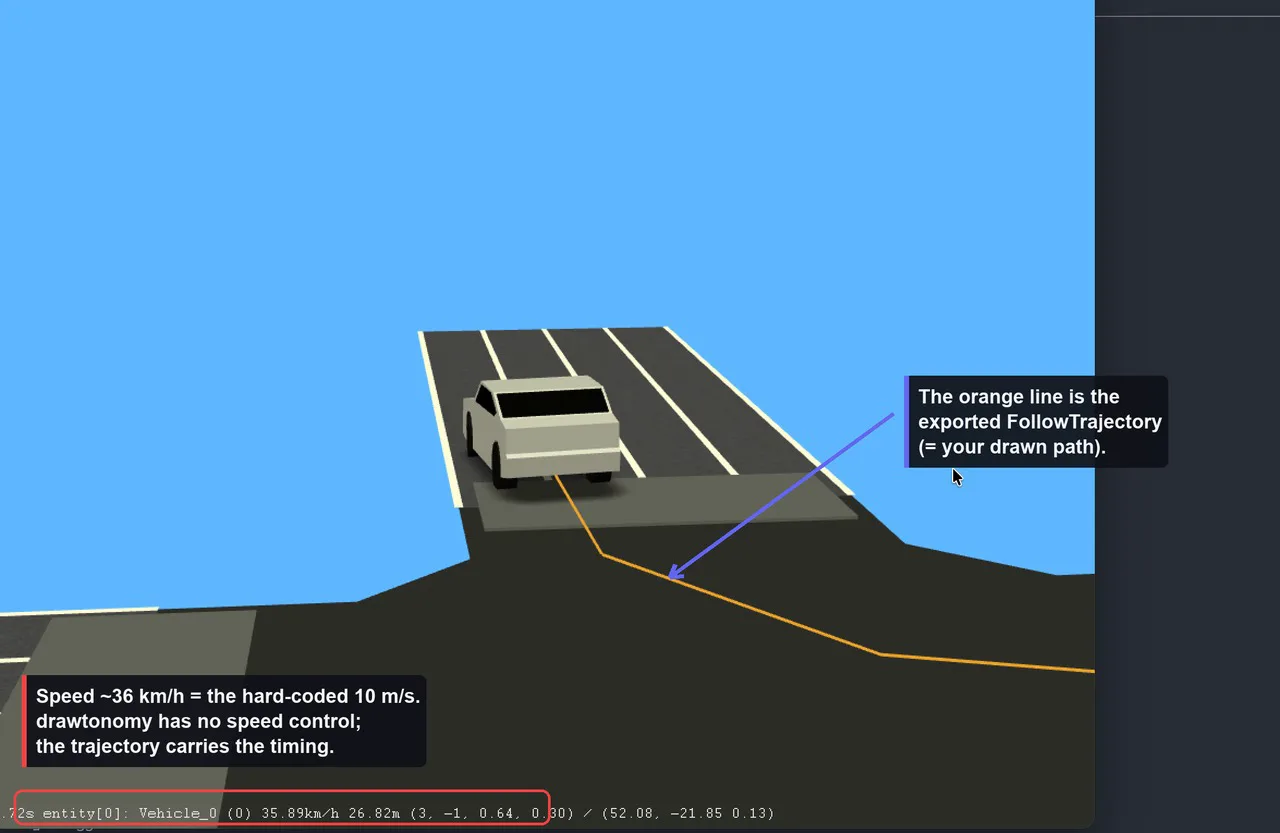
The vehicle drives along the orange line — that line is the
FollowTrajectoryAction generated from the path you drew.
What gets converted
Section titled “What gets converted”Into OpenDRIVE (.xodr)
Section titled “Into OpenDRIVE (.xodr)”| drawtonomy shape | OpenDRIVE element | Notes |
|---|---|---|
| Lane | one <road> | 1 lane = 1 independent road |
| Traffic light | <signal> on the nearest road | vehicle / pedestrian type only |
| Crosswalk | <object type="crosswalk"> | placed perpendicular to the road |
| Polygon (≥3 points) | <object type="patch"> with <outline> | fills intersection/area visuals |
Everything else — vehicles, pedestrians, standalone points, free
linestrings, text, images — is not written to the .xodr.
How far each road goes:
- Analytical geometry — curves are preserved. The road reference
line is fitted from the lane’s boundaries and emitted as ASAM
analytical geometry:
<arc>for circular segments and<paramPoly3>(parametric cubic) for the rest. A curved lane comes out as arcs and parametric polynomials, not as a chain of short straight<line>segments. (A gently curved single lane typically emits a mix such as a couple of<arc>and several<paramPoly3>primitives, with no<line>at all.)<spiral>(clothoid) geometry is not produced. - Per-lane layout. A road drawn from one drawtonomy lane emits a
center lane
id=0withtype="none"plus a single driving laneid=-1withtype="driving"— the drawn lane itself. It is not a fixed three-lane (+1 / 0 / -1, all driving) template. Multiple lane sections are not represented. - Road marks are hard-coded to a
solid white 0.13 mline. - No junctions. Every road carries
junction="-1"and no<junction>element is ever generated. Intersections are conveyed only by the polygon patch (visuals) and by predecessor/successor links derived from the lane’snext/prevconnections (first entry only). - No elevation / superelevation —
elevationProfileandlateralProfileare emitted empty (flat, planar roads). - Scale is fixed at 16.67 px/m; the geographic origin is
0.
Into OpenSCENARIO (.xosc)
Section titled “Into OpenSCENARIO (.xosc)”| drawtonomy shape | OpenSCENARIO element |
|---|---|
| Vehicle | a <ScenarioObject> (<Vehicle> or <Pedestrian>) |
| Path footprint (the head vehicle) | a <FollowTrajectoryAction> |
A “pedestrian” is just a vehicle shape whose template name matches a
pedestrian/walk pattern — it is emitted as <Pedestrian> instead of
<Vehicle>. Lanes, crosswalks, traffic lights and free linestrings are
not emitted into the .xosc.
When you export straight from Scene mode — paths and footprints, no authored logic — the scenario is deliberately minimal:
- The only dynamic behavior is
FollowTrajectoryAction— a time-stamped polyline. There are no speed actions, lane changes, traffic-light responses, collision avoidance, or any interaction conditions. - Each moving entity starts at
SimulationTime ≥ 0and the scenario has a hardStopTriggerat 60 s.
How a path footprint becomes vehicle motion
Section titled “How a path footprint becomes vehicle motion”This is the core of the dynamic export, so it is worth being precise.
A path is a linestring you draw, and footprints are ghost copies of a vehicle laid out along it (the trail you see in the editor). On export:
- Only the leading footprint (the first one) becomes a moving
<ScenarioObject>. The trailing ghosts are a canvas-side preview and are dropped — you get one vehicle that drives the whole path, not a queue. - The path’s control points become the trajectory vertices, in world (ENU) meters.
- Each vertex gets a
time, and the result is written as a<Trajectory>→<Polyline>of<Vertex time="…">inside a<FollowTrajectoryAction>.
Speed is fixed (this is the key limitation)
Section titled “Speed is fixed (this is the key limitation)”The trajectory is timed at a hard-coded 10 m/s (≈ 36 km/h). drawtonomy has no speed field anywhere in the UI, and the exporter never overrides the default. In esmini you will see the entity report ~36 km/h regardless of what you drew. You do not set a speed — you shape timing through the footprint layout, as described next.
Two timing modes
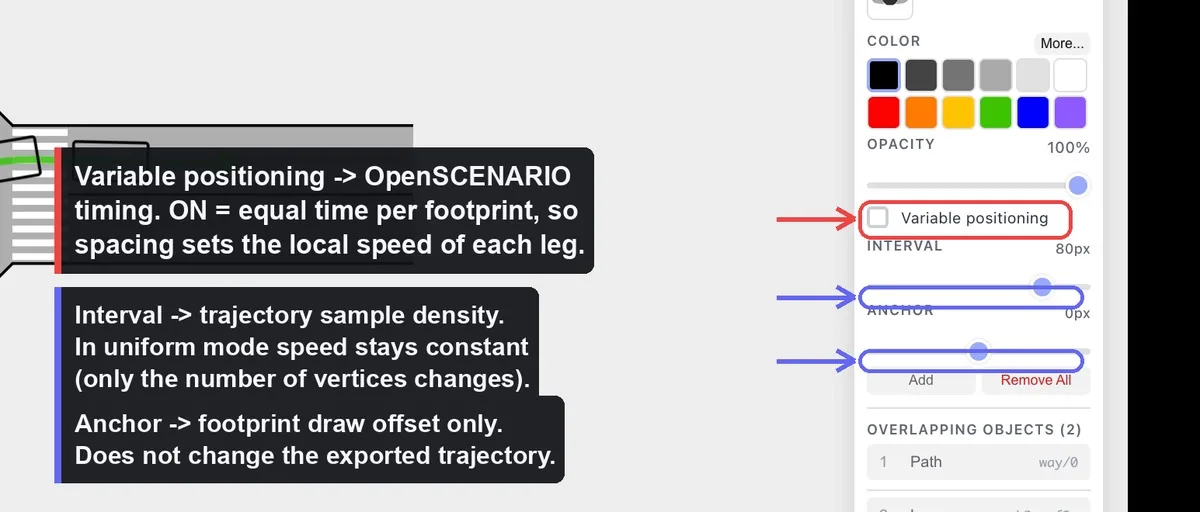
Section titled “Two timing modes”Whether the path’s “Variable positioning” toggle is on decides how time is distributed along the trajectory:
- Uniform (toggle OFF) — footprints sit at equal arc-length
Intervals and time is
distance / 10 m/s. The motion is constant speed. Changing the Interval only changes how many vertices are written (sample density); the path shape and total duration are unchanged. - Variable (toggle ON) — each footprint is pinned to a position along the path, and the total duration is split into equal time slices between footprints. Where footprints are packed close together the vehicle moves slowly; where they are spread out it moves fast. This is the only way to vary the effective speed along the route.
What you edit ↔ what changes in the .xosc
Section titled “What you edit ↔ what changes in the .xosc”| Editor action | Effect on the export |
|---|---|
| Move a path control point | Trajectory vertex coordinates + total duration (length changes, speed stays 10 m/s) |
| Drag a footprint in Variable mode | That footprint’s normalized position → the time of its vertex → the local (effective) speed of that leg |
| Toggle Variable positioning | Switches between equal-time and equal-speed timing |
| Change Interval (uniform mode) | Number of vertices only — trajectory shape and speed are unchanged |
| Change Anchor | Footprint draw offset only — no effect on the exported trajectory |
| Change the vehicle template | vehicleCategory, 3D model, bounding-box height, performance preset |
| Resize the vehicle (w, h) | BoundingBox dimensions and axle geometry |
| Rotate the vehicle | Initial heading (only when the vehicle has no trajectory) |
| Move the vehicle | Init WorldPosition (snapped to the trajectory start if it has one) |
So, to answer the common question directly: yes — moving a footprint partway along the path in Variable mode changes the exported speed plan, because it re-times that segment. Moving it in Uniform mode, or changing the Anchor, does not.
Values that are hard-coded
Section titled “Values that are hard-coded”For honesty about the scope, these come from fixed maps or constants, not
from anything you can edit: vehicle category/performance presets, 3D model
paths, vehicle height by category, axle geometry (derived from size),
following mode (position), the 60 s stop trigger, and — most importantly —
the 10 m/s trajectory speed.
Programmatic export
Section titled “Programmatic export”The exporter ships in @drawtonomy/sdk and runs without the editor. Unlike
the menu, the SDK also lets you emit the two files individually:
import { exporter, createSnapshot } from '@drawtonomy/sdk'
const snapshot = createSnapshot(shapes)
// Bundled (same as the menu):const { blob, baseName } = exporter.buildEsminiZip(snapshot, {  baseName: 'my-scene',})
// Or each format on its own:const xodr = exporter.exportToOpenDrive(snapshot)const xosc = exporter.exportToOpenScenario(snapshot, {  xodrFilename: 'my-scene.xodr',})
For the full API and extension points, see the Exporter SDK reference.
Versions emitted
Section titled “Versions emitted”| Format | Version |
|---|---|
| OpenDRIVE | 1.8 |
| OpenSCENARIO | 1.0, 1.1, or 1.2 (default 1.1) |
The .xosc export writes OpenSCENARIO 1.0, 1.1, or 1.2 — you choose
the schema version in the export dialog. 1.3 is shown but not yet
selectable (“coming soon”); esmini and other 1.x tools read the 1.2
output without issue.
Scope at a glance
Section titled “Scope at a glance”Supported: roads from lanes with analytical geometry (arc +
paramPoly3), so curves are preserved; signals, crosswalks and
intersection patches as OpenDRIVE objects; one vehicle per path following a
timed trajectory; a working esmini zip you can play immediately.
Not yet supported on the OpenDRIVE side: junctions, spiral
(clothoid) geometry, multiple lane sections, road elevation.
On the OpenSCENARIO side the Scene-mode export stays trajectory-only, but speed actions, lane changes, triggers, and multi-actor interaction are all available when you author the behaviour in the Scenario editor — that storyboard is what gets exported.
See also
Section titled “See also”- Scenario editor — author phases, events, actions, and triggers that export as the storyboard.
- Build your first scenario — from an empty canvas to a runnable, exportable lane change.
- Exporter architecture — what the pipeline does between snapshot and file.
- Adding a target format — wire up CARLA, SUMO, Unity, or anything else.