
OpenDRIVE / OpenSCENARIO / esmini में एक्सपोर्ट
drawtonomy आपके हाथ से बनाए दृश्य को ASAM
OpenDRIVE (.xodr)
रोड नेटवर्क और
OpenSCENARIO (.xosc)
सिनारियो में बदल देता है — दोनों एक zip में बंधे होते हैं जिसे आप
esmini में सीधे चला सकते हैं।
यह conversion जानबूझकर basic है — केवल वही shapes convert होती हैं जो ASAM data model में साफ-साफ map होती हैं, बाकी सब छोड़ दिया जाता है। यह पेज बताता है कि ठीक-ठीक क्या convert होता है, exported vehicle क्या करती है, और क्या scope से बाहर है — ताकि output कभी ज़रूरत से ज़्यादा वादे न करे।
पूरा round-trip देखें
Section titled “पूरा round-trip देखें”नीचे का वीडियो एक ही take में है: intersection बनाएं, path बनाएं, footprints generate करें, esmini zip export करें, फिर exported .xosc को esmini में चलाएं।
एडिटर से एक्सपोर्ट करें
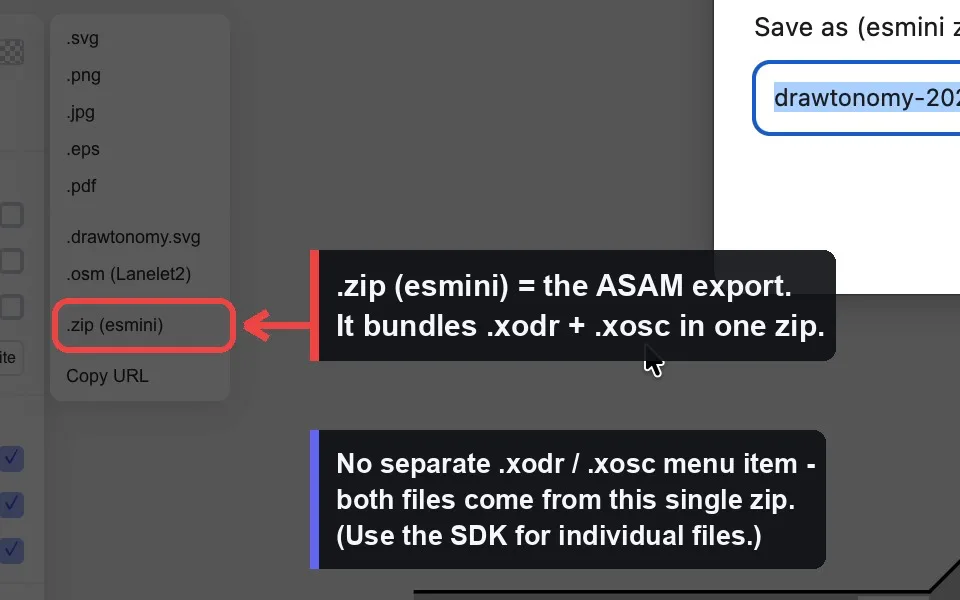
Section titled “एडिटर से एक्सपोर्ट करें”ASAM export का एक ही entry point है। drawtonomy में .xodr / .xosc के अलग-अलग menu item नहीं हैं — दोनों फ़ाइलें एक साथ बनती हैं और एक zip में pack होती हैं।
- अपना दृश्य बनाएं (लेन, intersection, vehicles, path…)।
- Menu खोलें → Export →
OpenSCENARIO + OpenDRIVE (.zip)। - Prompt पर एक base name डालें (default:
drawtonomy-<date>)। <name>.zipdownload होगी जिसमें<name>.xodr,<name>.xosc, और esmini के लिए ज़रूरी 3D model assets होंगी।
पूरा current page export होता है — ASAM target के लिए “selection only” mode नहीं है।
Playback करें
Section titled “Playback करें”unzip drawtonomy-2026-05-30.zipcd drawtonomy-2026-05-30esmini --osc drawtonomy-2026-05-30.xosc --window 60 60 1024 768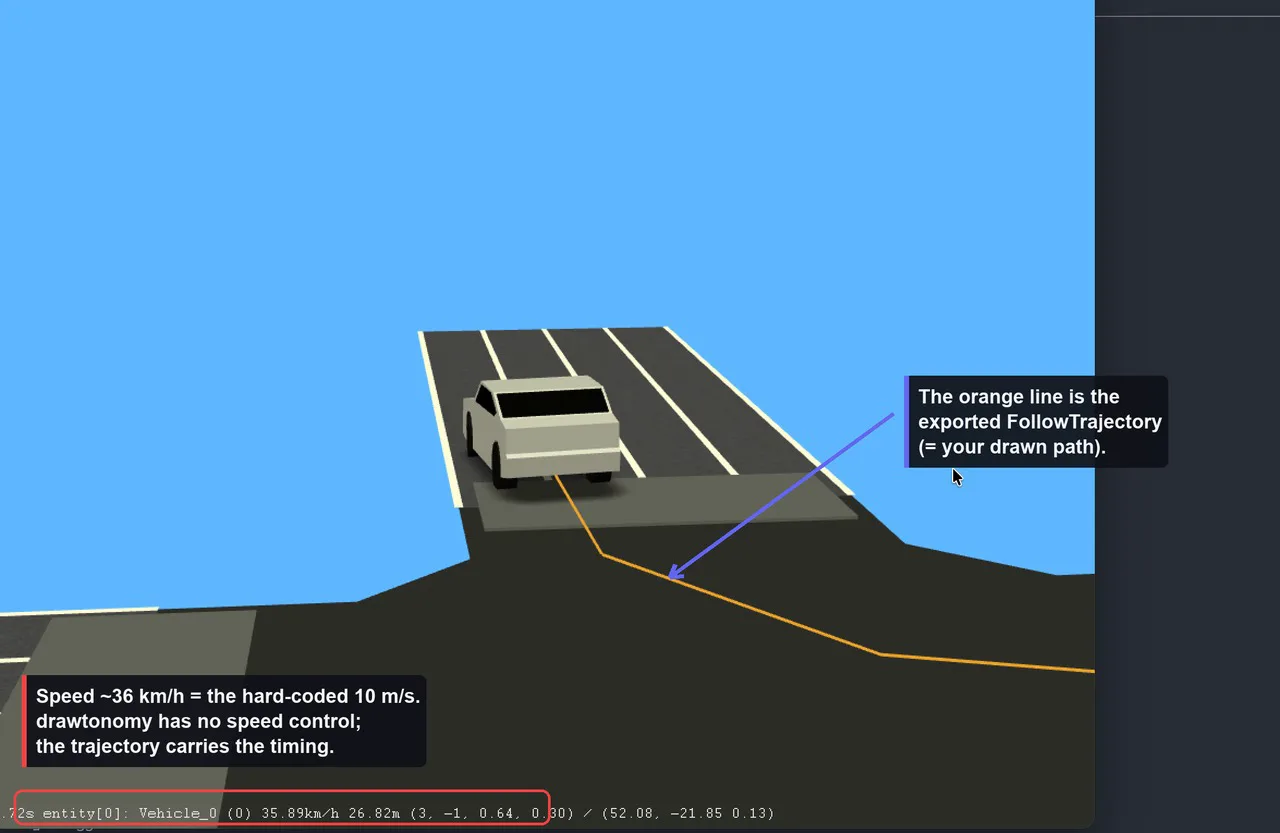
Vehicle orange line पर चलती है — वह line ही है FollowTrajectoryAction जो आपके बनाए path से generate हुई है।
क्या convert होता है
Section titled “क्या convert होता है”OpenDRIVE (.xodr) में
Section titled “OpenDRIVE (.xodr) में”| drawtonomy shape | OpenDRIVE element | नोट |
|---|---|---|
| Lane | एक <road> | 1 लेन = 1 independent road |
| Traffic light | निकटतम road पर <signal> | केवल vehicle / pedestrian type |
| Crosswalk | <object type="crosswalk"> | road के लंबवत रखा जाता है |
| Polygon (≥3 points) | <object type="patch"> with <outline> | intersection/area visuals के लिए |
बाकी सब — vehicles, pedestrians, standalone points, free linestrings, text, images — .xodr में नहीं लिखे जाते।
प्रत्येक road कैसी होती है:
- Geometry केवल straight lines। Road reference line को लेन की left/right boundaries से sample किया जाता है और
<line>segments के रूप में emit किया जाता है। कोईarc,spiral, याpoly3geometry नहीं बनती। - Fixed lane layout। हर road को exactly एक left lane (
id=1), एक center lane (id=0), और एक right lane (id=-1) मिलती है, सभीtype="driving"। Multi-lane roads और multiple lane sections represent नहीं होते। - Road marks hard-coded
solid white 0.13 mline हैं। - कोई junction नहीं। हर road
junction="-1"carry करती है और कोई<junction>element कभी नहीं बनता। Intersections केवल polygon patch (visuals) और लेन केnext/prevconnections से derived predecessor/successor links द्वारा दर्शाए जाते हैं (केवल पहली entry)। - कोई elevation / superelevation नहीं —
elevationProfileऔरlateralProfileखाली (flat, planar roads) emit होते हैं। - Scale 16.67 px/m fixed है; geographic origin
0है।
OpenSCENARIO (.xosc) में
Section titled “OpenSCENARIO (.xosc) में”| drawtonomy shape | OpenSCENARIO element |
|---|---|
| Vehicle | एक <ScenarioObject> (<Vehicle> या <Pedestrian>) |
| Path footprint (head vehicle) | एक <FollowTrajectoryAction> |
“pedestrian” वह vehicle shape है जिसका template name एक pedestrian/walk pattern से match करता है — वह <Vehicle> की जगह <Pedestrian> के रूप में emit होती है। Lanes, crosswalks, traffic lights और free linestrings .xosc में emit नहीं होते।
Exported scenario जानबूझकर minimal है:
- एकमात्र dynamic behavior
FollowTrajectoryActionहै — एक time-stamped polyline। कोई speed actions, lane changes, traffic-light responses, collision avoidance, या interaction conditions नहीं हैं। - हर moving entity
SimulationTime ≥ 0पर शुरू होती है और scenario में 60 s परStopTriggerhard-coded है।
Path footprint से vehicle motion कैसे बनती है
Section titled “Path footprint से vehicle motion कैसे बनती है”यह dynamic export का मूल है, इसलिए यहाँ सटीक जानकारी ज़रूरी है।
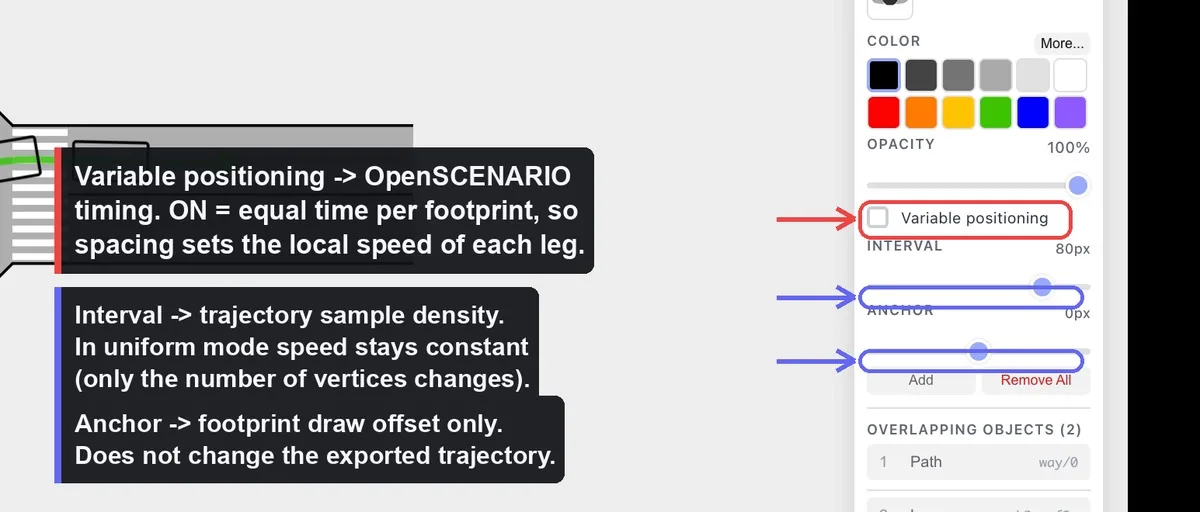
Path वह linestring है जो आप बनाते हैं, और footprints vehicle की ghost copies हैं जो उस path पर बिछी होती हैं (editor में दिखने वाला trail)। Export पर:
- केवल leading footprint (पहला) एक moving
<ScenarioObject>बनता है। बाकी trailing ghosts canvas-side preview हैं और drop हो जाते हैं — आपको एक vehicle मिलती है जो पूरा path चलाती है, queue नहीं। - Path के control points trajectory vertices बनते हैं, world (ENU) meters में।
- प्रत्येक vertex को एक
timeमिलता है, और result<Trajectory>→<Polyline>of<Vertex time="…">के रूप में<FollowTrajectoryAction>के अंदर लिखा जाता है।
Speed fixed है (यह मुख्य सीमा है)
Section titled “Speed fixed है (यह मुख्य सीमा है)”Trajectory hard-coded 10 m/s (≈ 36 km/h) पर timed है। drawtonomy के UI में कोई speed field नहीं है, और exporter कभी default override नहीं करता। esmini में entity ~36 km/h report करेगी चाहे आपने जो भी बनाया हो। आप speed set नहीं करते — आप footprint layout के ज़रिए timing को shape करते हैं, जैसा नीचे बताया गया है।
दो timing modes
Section titled “दो timing modes”Path का “Variable positioning” toggle on है या off — यह तय करता है कि trajectory के साथ time कैसे distribute होता है:
- Uniform (toggle OFF) — footprints equal arc-length Intervals पर बैठते हैं और time
distance / 10 m/sहै। Motion constant speed है। Interval बदलने से केवल vertices की संख्या बदलती है (sample density); path shape और कुल duration नहीं बदलते। - Variable (toggle ON) — हर footprint path पर एक position पर pin होता है, और कुल duration footprints के बीच equal time slices में split होती है। जहाँ footprints पास-पास हैं वहाँ vehicle धीरे चलती है; जहाँ वे फैले हैं वहाँ तेज़। Route पर effective speed vary करने का यही एकमात्र तरीका है।
आप क्या edit करें ↔ .xosc में क्या बदलता है
Section titled “आप क्या edit करें ↔ .xosc में क्या बदलता है”| Editor action | Export पर effect |
|---|---|
| Path control point move करें | Trajectory vertex coordinates + कुल duration (length बदलती है, speed 10 m/s रहती है) |
| Variable mode में footprint drag करें | उस footprint की normalized position → उसके vertex का time → उस leg की local (effective) speed |
| Variable positioning toggle करें | Equal-time और equal-speed timing के बीच switch |
| Interval (uniform mode) बदलें | केवल vertices की संख्या — trajectory shape और speed नहीं बदलतीं |
| Anchor बदलें | Footprint draw offset केवल — exported trajectory पर कोई effect नहीं |
| Vehicle template बदलें | vehicleCategory, 3D model, bounding-box height, performance preset |
| Vehicle resize करें (w, h) | BoundingBox dimensions और axle geometry |
| Vehicle rotate करें | Initial heading (केवल तब जब vehicle की कोई trajectory न हो) |
| Vehicle move करें | Init WorldPosition (trajectory start पर snap हो जाती है अगर एक हो) |
सीधे जवाब में: हाँ — Variable mode में path पर footprint move करने से exported speed plan बदलती है, क्योंकि उस segment को re-time किया जाता है। Uniform mode में या Anchor बदलने से नहीं बदलती।
Hard-coded values
Section titled “Hard-coded values”Scope की ईमानदारी के लिए — ये fixed maps या constants से आती हैं, न कि किसी ऐसी चीज़ से जो आप edit कर सकते हैं: vehicle category/performance presets, 3D model paths, category के हिसाब से vehicle height, axle geometry (size से derived), following mode (position), 60 s stop trigger, और — सबसे महत्वपूर्ण — 10 m/s trajectory speed।
Programmatic एक्सपोर्ट
Section titled “Programmatic एक्सपोर्ट”Exporter @drawtonomy/sdk में ship होता है और editor के बिना चलता है। Menu के विपरीत, SDK दोनों फ़ाइलें अलग-अलग भी emit करने देता है:
import { exporter, createSnapshot } from '@drawtonomy/sdk'
const snapshot = createSnapshot(shapes)
// Bundled (same as the menu):const { blob, baseName } = exporter.buildEsminiZip(snapshot, {  baseName: 'my-scene',})
// Or each format on its own:const xodr = exporter.exportToOpenDrive(snapshot)const xosc = exporter.exportToOpenScenario(snapshot, {  xodrFilename: 'my-scene.xodr',})
पूर्ण API और extension points के लिए, Exporter SDK reference देखें।
Emit होने वाले Versions
Section titled “Emit होने वाले Versions”| Format | Version |
|---|---|
| OpenDRIVE | 1.8 |
| OpenSCENARIO | 1.3 |
एक नज़र में scope
Section titled “एक नज़र में scope”Supported: लेनों से straight-line roads; signals, crosswalks और intersection patches OpenDRIVE objects के रूप में; timed trajectory follow करती एक vehicle per path; एक working esmini zip जिसे आप तुरंत चला सकते हैं।
अभी supported नहीं: OpenDRIVE junctions, curved geometry, multi-lane roads, road elevation; OpenSCENARIO speed actions, lane changes, traffic-light logic, multi-agent interaction, या कोई भी per-vehicle speed control।
यह भी देखें
Section titled “यह भी देखें”- Exporter architecture — snapshot और file के बीच pipeline क्या करती है।
- Target format जोड़ना — CARLA, SUMO, Unity, या कुछ और wire up करें।