CommonRoad scenario editor, export, and planner replay
Nội dung này hiện chưa có sẵn bằng ngôn ngữ của bạn.
Draw a scenario or open one you already have, export it as CommonRoad XML, solve it with your own motion planner, and replay the planner’s solution in drawtonomy with the official checker’s verdict on the badge.
CommonRoad (TU Munich) is the benchmark format for motion-planning research: lanelets, other traffic as recorded trajectories, and a planning problem for the ego. drawtonomy is the two ends of that loop, the authoring side and the viewing side.
Three ways in
Section titled “Three ways in”Every row ends at the same place: a CommonRoad XML your planner reads, a solution you replay, and a verdict on the badge.
| Start from | How | What you get |
|---|---|---|
| A scenario you draw | lanes, vehicles, speeds, an ego mark and a goal lane on the canvas | a CommonRoad 2020a scenario with lanelets, dynamicObstacle trajectories and a planningProblem |
| An existing OpenSCENARIO file | drop the .xosc and its .xodr, or open it straight from GitHub with ?open= | the same export, from a scenario you already own. See Export a scenario |
| A CommonRoad benchmark scenario | drop the .xml on the canvas | the scenario on an editable canvas; elements drawtonomy does not draw are carried through, so an unedited re-export is the original file back |
Once a solution exists, all three replay the same way: drop the
solution.xml and the ego follows the planner’s trajectory. With Ghost
on, its stamps are laid along that driven trajectory at the interval you
choose. Drop the .verdict.json next to it and the
run badge ends in RUN PASS or RUN FAIL, with Checker PASS 7/7 or
Checker FAIL 2/7 in its tooltip and in the toast, plus the failing checks,
the obstacle involved and the time range in the tooltip and on the timeline.
The shortest route for you
Section titled “The shortest route for you”- You develop a motion planner and want scenarios beyond the benchmark corpus.
Go to Bring your own planner.
It starts at
pip installand ends with a naive planner failing and an IDM planner passing on the same scene. - You have OpenSCENARIO files and want to run a planner against them. Start at Export a scenario, then follow Bring your own planner.
- You need the official verdict and the evidence behind it. Go to Verdict reference for the seven checks, the sidecar format and how the badge reads.
What the loop looks like
Section titled “What the loop looks like”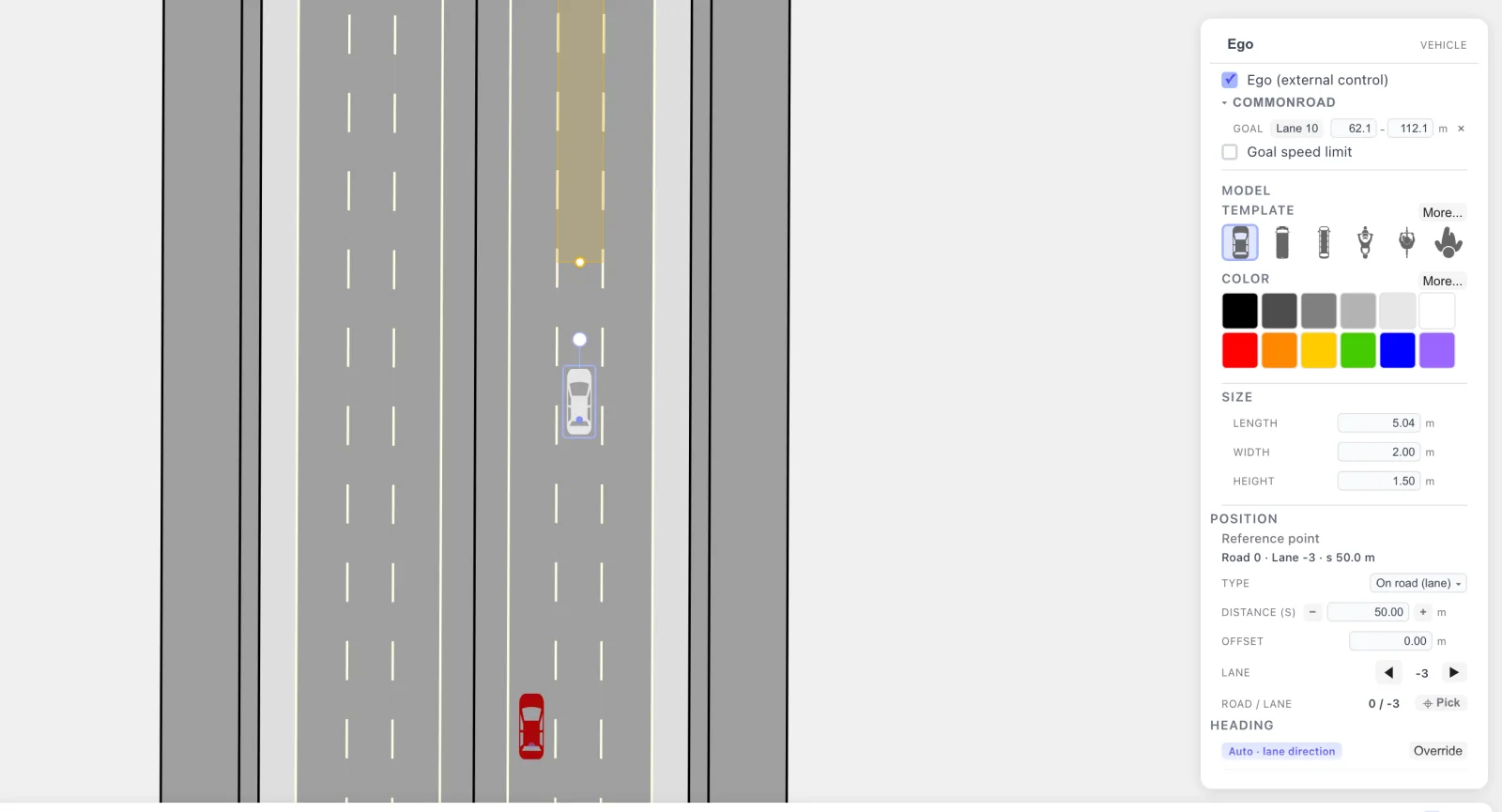
Before Play: the vehicle marked as Ego and the goal, a 50 m stretch of lane put down with one click. That is the whole planning problem.
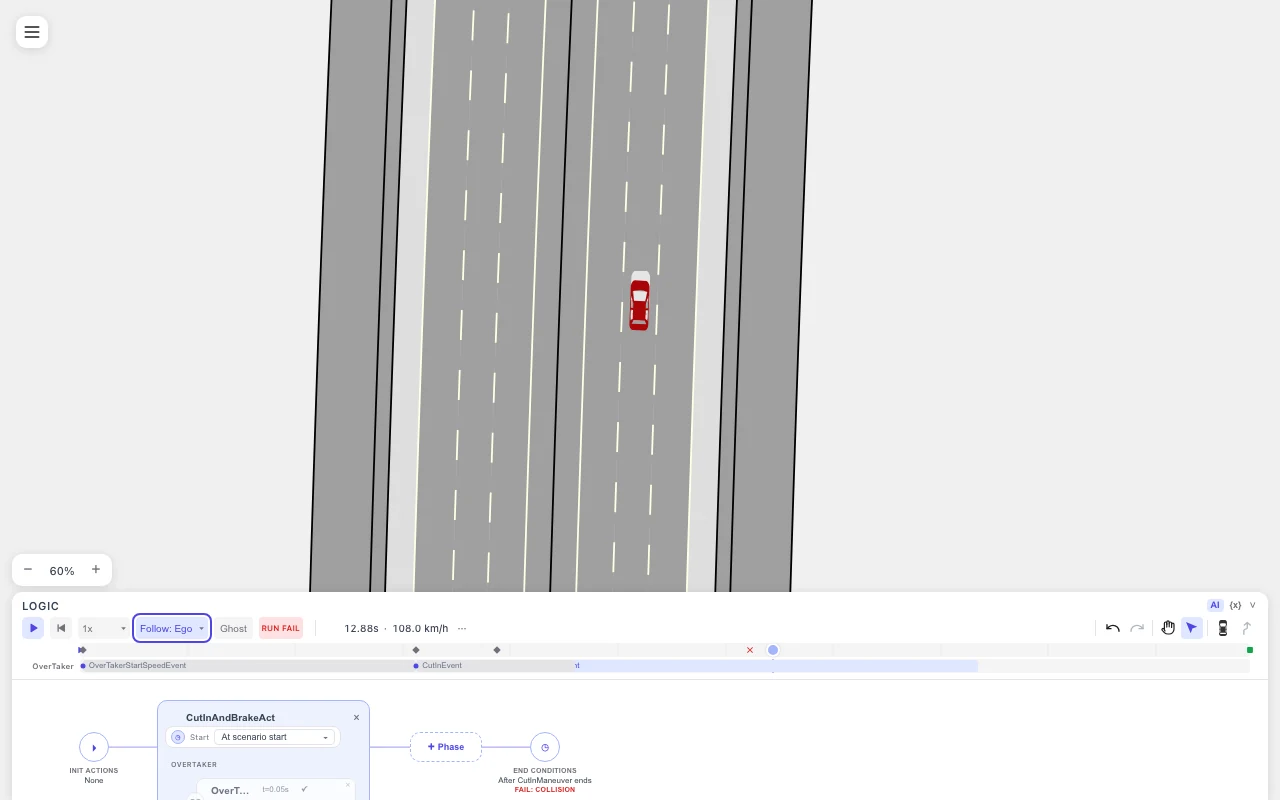
The scenario as drawn: an unreactive ego at 108 km/h meets the cut-in at t = 12.9 s and the badge reads RUN FAIL. That is the problem the planner has to solve.
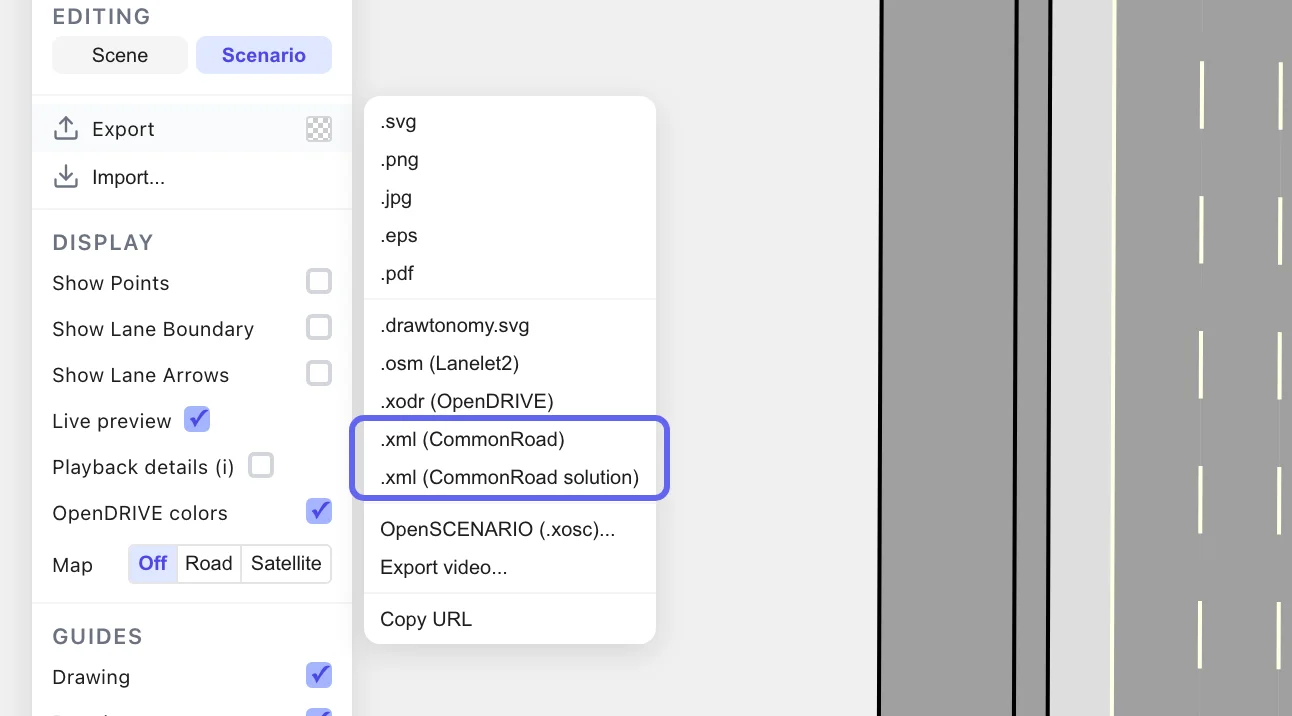
Export writes the CommonRoad scenario XML, plus the ego you drew as a reference solution file.
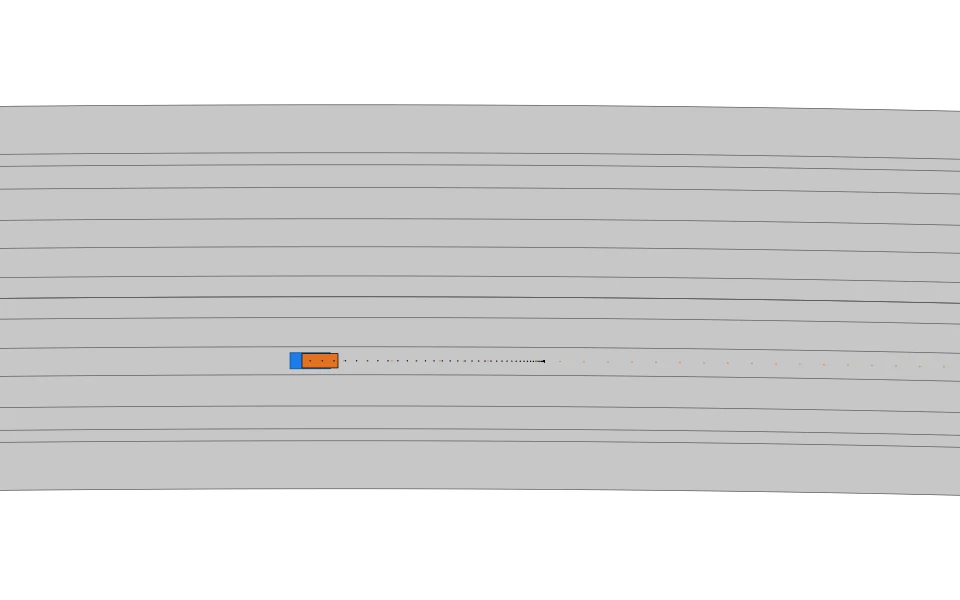
The exported file replayed by commonroad-io with no planner: the ego you
drew hits the cut-in at the same 12.9 s.
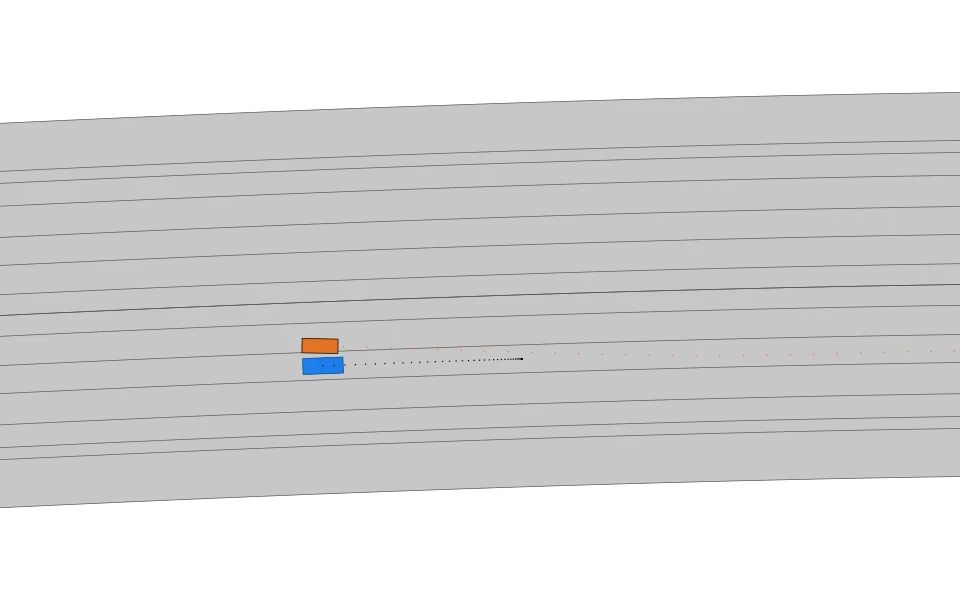
The reactive planner solves it and drives on to the goal: obstacle collision, road boundary, goal reached and kinematic feasibility all pass.
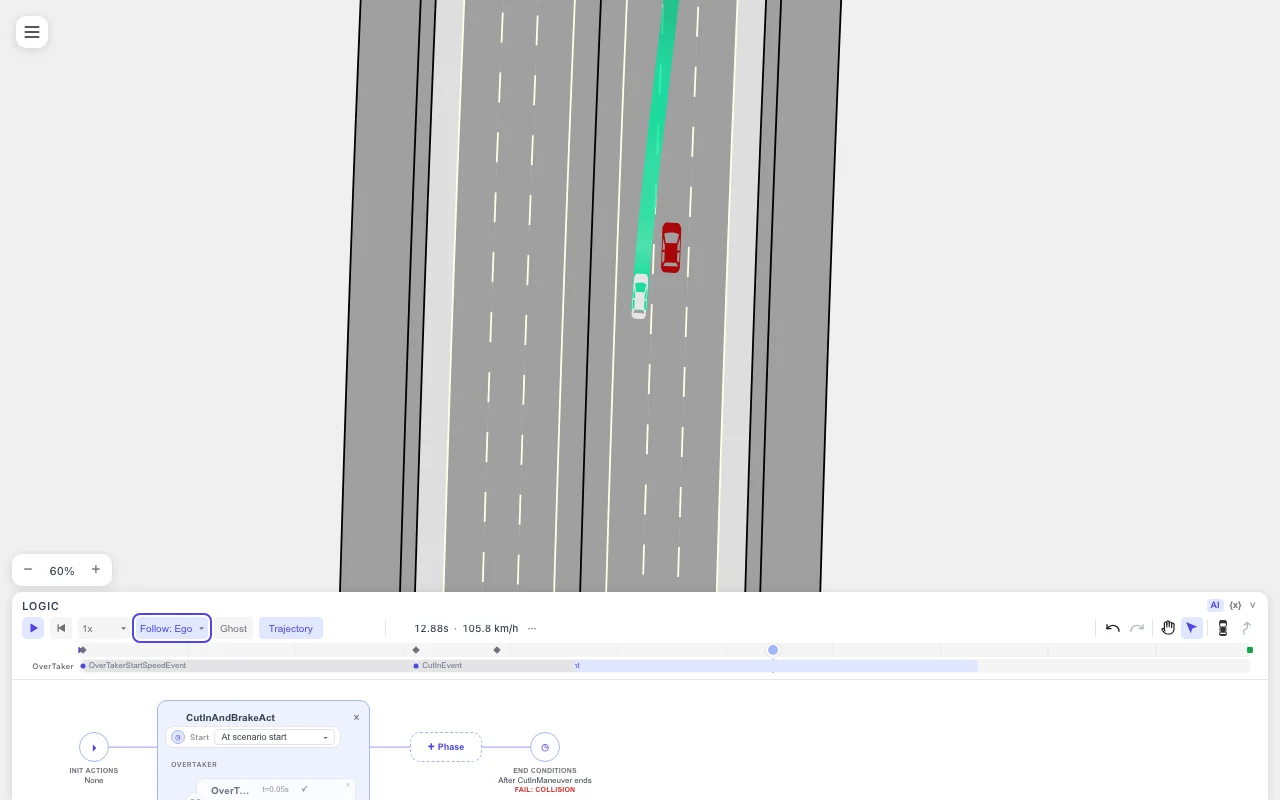
Back in drawtonomy: the planner’s ego (white) passes left of the cut-in on the green planned trajectory, and the badge reads RUN PASS at the end. The shade of that green is acceleration here — the default, and switchable to speed on the Trajectory panel — and it fades toward the far end of the plan.
Share it as a link
Section titled “Share it as a link”Once the scenario, the solution and the verdict live in a GitHub repository,
one URL opens all three, with no install and no extension: append the
scenario’s GitHub file URL to ?open=, then add &solution= and &verdict=
(either relative to the scenario file or as full GitHub URLs). Only ?open=
is required. The same three parameters work against a local folder that
drawtonomy-cr open is
serving.
The URL is a single line with this shape (replace the <...> parts with your
own):
https://drawtonomy.com/?open=https://github.com/<owner>/<repo>/blob/<branch>/<path>/<scenario>.xml&solution=<solution>.xml&verdict=<solution>.verdict.jsonA working one, built from the public sample files used in the video above:
https://drawtonomy.com/?open=https://github.com/kosuke55/drawtonomy/blob/main/packages/drawtonomy-commonroad/tests/fixtures/cutin_commonroad.xml&solution=planner_solution.xml&verdict=planner_solution.verdict.jsonCan I convert OpenSCENARIO to CommonRoad?
Section titled “Can I convert OpenSCENARIO to CommonRoad?”Yes. Open a .xosc together with its .xodr, mark the ego, pick a goal lane,
then Export ▸ CommonRoad (.xml). The road network becomes lanelets,
every other actor becomes a dynamicObstacle with its trajectory, and the ego
becomes the planningProblem. The steps are in
Export a scenario.
Which CommonRoad version does drawtonomy read and write?
Section titled “Which CommonRoad version does drawtonomy read and write?”CommonRoad XML 2020a, for both scenario and solution files. The output is
validated against the official XSD and read unchanged by commonroad-io, the
drivability checker and commonroad-reactive-planner.
Does drawtonomy run the official drivability checker?
Section titled “Does drawtonomy run the official drivability checker?”No. drawtonomy writes the scenario and replays the solution;
commonroad-drivability-checker decides whether the solution passed. The
drawtonomy-cr verdict command runs the seven official checks and writes a
small JSON sidecar that drawtonomy shows on the run badge. See
Verdict reference.
Do I need the planning trace?
Section titled “Do I need the planning trace?”No. The solution.xml is the only required file. A
planning trace is optional and
adds what the planner intended at each replanning cycle on top of what it
drove.
Is this Linux only?
Section titled “Is this Linux only?”The editor, the export and the replay run in any browser. Only the official
checker needs Linux x86_64, because that is the only platform
commonroad-drivability-checker ships wheels for. Without it, verdict exits
with code 3 and one line saying so, and everything else still works.
Do I have to install anything to open a CommonRoad file?
Section titled “Do I have to install anything to open a CommonRoad file?”No. drawtonomy.com reads CommonRoad .xml in the
browser. pip install drawtonomy-commonroad is only needed for the verdict
step and the drawtonomy-cr open loop.
Can I use my own vehicle model?
Section titled “Can I use my own vehicle model?”Yes. The solution declares the CommonRoad vehicle model (KS, PM, …) and
vehicle type (BMW_320i, …) that the checker judges with. Declare the same
body in a planning trace so
drawtonomy draws what the checker saw.
Does an unedited export preserve every byte?
Section titled “Does an unedited export preserve every byte?”The values, yes, with one exception; the layout, not always. An unedited element is written back from its original text, so real-world benchmark scenarios we opened and re-exported came back byte for byte. What can differ:
- XML comments are not kept, and an XML declaration is added if the file has none.
- Some hand-formatted elements are re-indented. Their values do not change.
stopLinepoints are written with six decimals, so a stop-line coordinate with more digits is rounded to the micrometre.
Does a cooperative solution replay every trajectory?
Section titled “Does a cooperative solution replay every trajectory?”No. drawtonomy selects the trajectory matching the scene’s ego planning problem when available, and reports the other trajectories it did not load. It does not preserve all solution trajectories for lossless re-export. A solution exported from the authoring scene contains the recorded ego trajectory.
Feature matrix
Section titled “Feature matrix”Three tiers: Supported means the element is read, editable where the canvas has a concept for it, and written on export. Round-trip only means an unedited file re-exports with the element unchanged, but there is no canvas UI to create or edit it. Not supported means the element is either not read, or read and not written back.
| Element | Supported | Round-trip only | Not supported |
|---|---|---|---|
Lanelets: geometry, laneletType, userOneWay / userBidirectional, lineMarking, stopLine, adjacentLeft / adjacentRight | Yes. Unedited lanelets are written back unchanged. Moving a boundary point changes only that point’s coordinates: laneletType, users, lineMarking, adjacentLeft / adjacentRight and sign and light references keep their original values, and predecessor / successor are derived again from where the lanelet ends meet, which gives the original ones while the ends still meet. A boundary that two lanelets share is one line on the canvas, and the end of a lanelet and the start of its successor are one point, so moving such a point moves it in every lanelet that uses it. An edited lanelet’s stopLine keeps its marking and references but loses its points, because the original coordinates may no longer fit the new boundary | ||
trafficSign, intersection | Yes (carried through, not drawn or editable. Editing the geometry of a lanelet they reference keeps them; deleting that lanelet drops them, and a toast names what was dropped) | ||
trafficLight | Yes (drawn and follows playback: the light shows its state at time t, and the lanes it controls into (the successors of the referencing lanelet, as the official renderer does) are tinted with that state: the same colours at the same time as the official renderer, drawn as a thinner, lighter line, and hidden with Display → Signal lanes. Carried through unchanged; deleting a light on the canvas drops it and its references from the export. Cycle, direction and position are not editable, and moving a light does not write its position back) | ||
dynamicObstacle shape | rectangle | circle / polygon (drawn as their bounding rectangle; the original shape is written back, also after you move the obstacle) | |
dynamicObstacle state: position, orientation, time, velocity, acceleration | Yes | ||
dynamicObstacle state: yawRate, slipAngle, and other kinematic fields beyond the five above; interval-valued states (intervalStart / intervalEnd) | Yes (kept verbatim for obstacles you did not edit. When you edit an obstacle, the states the edit changes are rebuilt from the recording: yawRate is recalculated from the motion, slipAngle is carried over from the original while the number of states stays the same, and other fields such as the steering angle and interval values are not kept. A warning names the obstacle and says which fields were recalculated, carried over or dropped. States the edit did not change keep their original XML) | ||
initialSignalState / signalSeries (vehicle lights, horn) | drawn during replay and written back unchanged, also for an obstacle you edit (not editable, no LightStateAction mapping) | ||
staticObstacle, environmentObstacle, phantomObstacle | Yes (carried through, not created) | ||
planningProblem (one ego, one goal) | Yes, the first one | a second planningProblem (drawn read-only: initial state and goal), or a second goalState | |
| Goal position: lanelet reference | Yes (Pick lane on the whole lane: a lane of 50 m or less, or the range set to the lane’s full length. A stretch of a longer lane, 50 m by default, is written as a <polygon>) | ||
| Goal position: rectangle, circle, polygon | Yes (carried through, not editable. A rectangle that lies on one lanelet is also shown as a goal stretch on that lane. Picking a goal lane replaces the region with a <polygon> for the picked stretch, or a lanelet reference for the whole lane, and keeps the time, orientation and velocity intervals; a toast says the region was replaced) | ||
| Goal time, orientation, velocity intervals | velocity (as an upper bound), time (in seconds), orientation (in degrees) | ||
location (geo reference, tags) | Yes (carried through) | ||
| Scenario metadata (author, source, tags) | Yes (carried through) | ||
timeStepSize (dt) | Yes (kept from the opened file) | editing it in the canvas | |
Solution files: PM, KS, ST, MB, KST trajectories | position, orientation, velocity are replayed. If you edit the ego, Export writes its path as a PM solution | a loaded solution exported without editing the ego comes back byte for byte, model-specific fields included | model-specific fields (steeringAngle, yawRate, …) are not used in replay |
See Goal criteria for the position/time/orientation/velocity breakdown, and Time mapping for how continuous OpenSCENARIO seconds line up with discrete CommonRoad steps.
Status
Section titled “Status”| Format | CommonRoad XML 2020a (scenario + solution) |
| Package | pip install drawtonomy-commonroad (PyPI), Python 3.11+ |
| Validated with | official XSD · commonroad-io read/write round-trip · drivability checker · commonroad-reactive-planner · import to re-export round-trip over the 635 hand-crafted scenarios of the official benchmark corpus |
| Ego / goal | mark the ego as external control, pick a goal lane on the canvas |
| Import | CommonRoad scenario .xml (2020a): lanelets, obstacles, planning problem, goal lane; unsupported elements carried through to re-export |
| Replay inputs | CommonRoad solution.xml · checker verdict (.verdict.json) · planning trace · esmini .csv log · drawtonomy recording |
| Share | ?open=<GitHub file URL>, plus &solution= / &verdict= |
| Not drawn | traffic signs and intersections are carried through on import and re-export, but are not drawn or editable on the canvas. Traffic lights are drawn and change with playback time, but their cycles are read-only |
| Availability | in the app at drawtonomy.com, no install |
Have a planner workflow you would like this to fit, or a benchmark scenario that does not open cleanly? Get in touch.
Related: Open and play a .xosc, Export formats, drawtonomy for GitHub.