
Validation — what drawtonomy checks before it runs
Это содержимое пока не доступно на вашем языке.
Before drawtonomy hands your scenario to esmini, it resolves every catalog reference and every parameter in the file. Anything that cannot be resolved is reported with the actor and the attribute named, next to the ▶ button — not as a simulation that quietly does the wrong thing.

The one-line cause is always visible. Details opens the fix and the simulator’s own log line for people who want them.

Two severities
Section titled “Two severities”| What it means | Playback | |
|---|---|---|
| Error (red, next to ▶) | The reference cannot be resolved. Running it would either fail to load or silently use the wrong value. | Blocked until you fix it |
| Warning (⚠ next to ▶) | The scenario runs, but not with what the file literally asks for — usually because a catalog is missing and a built-in model stands in. | Not blocked |
Warnings sit behind the ⚠ button so a working scenario stays uncluttered. On narrow windows the ⚠ button is hidden entirely; the import toast still tells you once.
Errors
Section titled “Errors”entryName is not in the loaded catalog
Section titled “entryName is not in the loaded catalog”Ego: CatalogReference@entryName “car_does_not_exist_xyz” is not in the loaded catalog — the simulator refuses to load this scenario.
What it means. Your <CatalogReference entryName="…"> names a vehicle,
pedestrian, or object that does not exist in the catalog files you opened with
the scenario. esmini looks the name up literally and aborts.
How to fix it. Use a name that exists in the catalog file. drawtonomy
suggests one when the difference is only capitalisation — Did you mean
“car_white”? Otherwise open the catalog .xosc and copy an <Vehicle name="…">
value from it.
The lookup is case-sensitive and exact: Car_White and car_white are two
different entries.
catalogName matches no catalog file
Section titled “catalogName matches no catalog file”Ego: CatalogReference@catalogName “NoSuchCatalog” matches no catalog file name in <CatalogLocations> — the simulator looks for “NoSuchCatalog.xosc” and cannot locate it.
What it means. catalogName is a file name, not a label. esmini
searches the <CatalogLocations> directories for <catalogName>.xosc.
How to fix it. Point catalogName at a catalog file that is actually
mounted, or add that file to one of your <CatalogLocations> directories when
you open the scenario.
A $param is not declared
Section titled “A $param is not declared”Ego: LanePosition@s references $EgoStartS, which is not declared in <ParameterDeclarations> — the value cannot be resolved.
What it means. An attribute refers to a parameter that no
<ParameterDeclaration> defines — often a rename that missed one use site, or a
scenario copied out of a set where the parameter lived in another file.
How to fix it. Declare it in <ParameterDeclarations>, or replace the
reference with a literal value. If the name is close to an existing one,
drawtonomy suggests it.

A declared parameter’s value does not match its type
Section titled “A declared parameter’s value does not match its type”Parameter “EgoStartS” is declared as double but its value “not_a_number” is not a valid double — every attribute that reads $EgoStartS becomes NaN.
What it means. parameterType="double" (or integer, or boolean) with a
value that cannot be parsed as one.
How to fix it. Correct the value, or change parameterType to string if
the value really is text.
Warnings
Section titled “Warnings”Catalog files were not loaded
Section titled “Catalog files were not loaded”Ego: CatalogReference “$HostVehicle” plays as default_car (5.0 x 2.0 m).
What it means. You opened a .xosc without its catalog files. Rather than
refusing to play, drawtonomy substitutes a built-in model so you can still see
the scenario move — but the dimensions are the substitute’s, not the ones the
file asks for.
How to fix it. Open the scenario together with its catalog files (see
Open and play a .xosc), or use a built-in entry
name such as car_white.
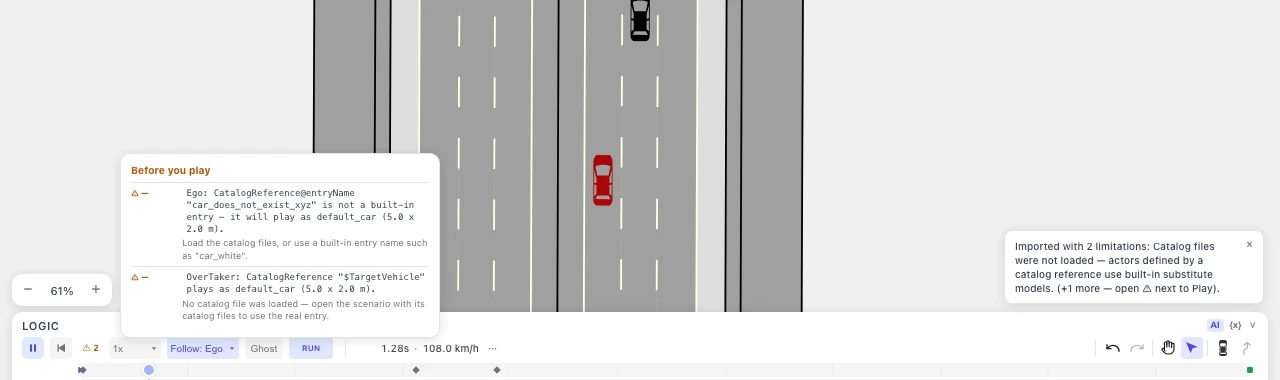
entryName is not a built-in entry
Section titled “entryName is not a built-in entry”Ego: CatalogReference@entryName “car_does_not_exist_xyz” is not a built-in entry — it will play as default_car (5.0 x 2.0 m).
The same situation, seen from the other side: no catalog is loaded and the name is not one drawtonomy knows. This is a warning rather than an error because naming an entry from a catalog you have not mounted yet is a legitimate way to work — the scenario stays playable with a stand-in model.
A ParameterAssignment targets an undeclared parameter
Section titled “A ParameterAssignment targets an undeclared parameter”Ego: ParameterAssignment@parameterRef “NotADeclaredParam” is not declared by catalog entry “car_white” — the assignment is ignored.
What it means. Your <ParameterAssignments> sets a parameter the catalog
entry does not declare, so it has no effect. The hint lists the parameters that
entry does declare.
How to fix it. Use one of the declared names, or drop the assignment.
What is not checked
Section titled “What is not checked”- Catalog kinds other than vehicles, pedestrians, and objects. Controller,
route, maneuver, environment, and trajectory catalogs are resolved by the
simulator, not by drawtonomy — a reference to one of those is checked only at
the
catalogNamelevel, to avoid reporting entries that are fine. - Whether the scenario does what you meant. Validation is about references resolving, not about the manoeuvre being correct. For that, run it and use fail conditions.
AI-generated scenarios
Section titled “AI-generated scenarios”The same catalog check runs on scenarios from AI generation, at the Logic gate — one stage before the simulator runs. A generated scenario that invents a vehicle model is rejected and regenerated, rather than played with a stand-in.