
End and fail conditions — stop the run, and judge it
Konten ini belum tersedia dalam bahasa Anda.
Two different questions, two different panels:
- END CONDITIONS — when does the run stop?
- FAIL CONDITIONS — was the run a failure?
Both live on the last node of the logic graph. Select the END CONDITIONS node and the attribute panel shows both sections.
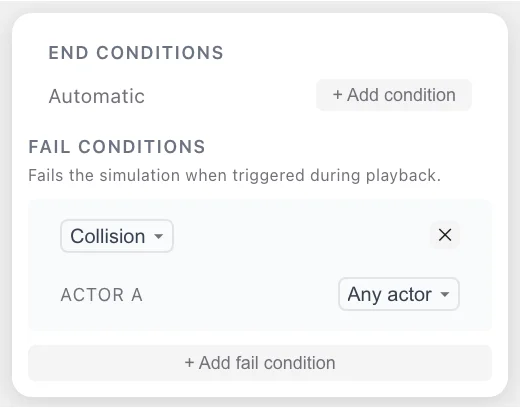
Keeping them apart matters. A run that stops after 30 seconds has not therefore succeeded, and a run that ends in a collision after 4 seconds has not therefore behaved correctly. The end condition controls the clock; the fail conditions decide the verdict.
END CONDITIONS
Section titled “END CONDITIONS”The node summarises itself in one line:
| Summary | Meaning |
|---|---|
Automatic | No explicit condition. The run stops when every phase and event has finished. |
After <name> ends | An imported StopTrigger, for example After CutInManeuver ends. |
+ Add condition in the panel lets you set one explicitly. The
choices are the same catalogue used for
event triggers, minus
Immediately (no condition) — 18 conditions:
Simulation time · Time gap to actor · Time to collision ·Distance to actor · Traveled distance · Phase / event state ·Distance to point · Reach position · End of road · Actor speed ·Relative speed · Stand still · Actor acceleration · Collision ·Off-road · Scenario parameter · Scenario variable · Traffic signalConditions combine with ALL OF (AND) and or… exactly as event triggers do.
In the exported .xosc this becomes the storyboard’s StopTrigger,
so other OpenSCENARIO 1.x tools honour it.
Three end conditions cover most work:
- Leave it on
Automaticwhile you are authoring. The run stops by itself once your events are done. Simulation timefor a fixed-length run — the usual choice when a scenario feeds a batch or a comparison.Phase / event state, stateendsto stop as soon as the manoeuvre under test completes, no matter how long it takes.
FAIL CONDITIONS
Section titled “FAIL CONDITIONS”The section says what it does:
FAIL CONDITIONS Fails the simulation when triggered during playback.
A fail condition is an assertion. If it triggers at any point during
the run, the run ends with a FAIL verdict instead of running to
its end condition.
New scenarios start with one:
[Collision ▾] [✕]ACTOR A [Any actor ▾]Collision (default) — added automatically for new scenarios.So a freshly drawn scenario already fails on any collision. + Add fail condition adds another row; each row has an ✕ to remove it. A newly added row repeats the same type as the default, so change its type after adding it.
Fail conditions are drawtonomy’s own concept — they are not part of the ASAM OpenSCENARIO standard. See How they are stored.
The eight types
Section titled “The eight types”| Type | Fails when |
|---|---|
| Collision | The selected actor collides with another entity. Any actor watches every entity in the scenario. |
| Actor speed | An actor’s speed satisfies the rule you set — absolute, or relative to another actor. |
| Distance to actor | The distance between two actors falls below, or exceeds, a threshold. |
| Distance to point | An actor’s distance to a fixed point falls below, or exceeds, a threshold. |
| Longitudinal distance to actor | The along-road gap to another actor crosses a threshold, measured ahead, behind, or either way. |
| Duration | Another condition holds continuously for longer than a given time. |
| Simulation time | The run reaches a given time — a timeout. |
| Phase state | A phase starts, is running, or ends. |
The options each type exposes
Section titled “The options each type exposes”| Setting | Choices |
|---|---|
| Actor selection | Any actor, or a named entity |
| Distance rule | falls below / exceeds |
| Speed rule | = equals / > greater than / ≥ greater or equal / < less than / ≤ less or equal / ≠ not equal |
| Speed basis | Absolute speed / Relative to actor |
| Relative speed direction | Any direction / Faster / Slower / Same speed |
| Longitudinal side | Ahead or behind / Ahead / Behind |
| Phase state | starts / is running / ends |
Duration wraps another condition
Section titled “Duration wraps another condition”Duration is not a condition of its own — it is a “for how long” wrapper. Pick it, then pick the inner condition from four:
- Actor speed
- Distance to actor
- Distance to point
- Longitudinal distance to actor
This is how you express tolerance. “The gap dropped below 5 m for a single frame” is usually noise; “the gap stayed below 5 m for two seconds” is a finding. Wrap the distance condition in a Duration and you have said the second thing.
Reading the verdict
Section titled “Reading the verdict”
The badge on the transport row reports the state of the run:
| Badge | Meaning |
|---|---|
IDLE | Not running. Nothing has been evaluated. |
RUN | Running. No fail condition has triggered yet. |
PASS | The run reached its end condition without any fail condition triggering. |
FAIL | A fail condition triggered. The run stopped there. |
PASS therefore means “finished, and none of my assertions fired”. It
is only as meaningful as the fail conditions you wrote — a scenario
with the conditions removed will report PASS for almost any
behaviour.
Turning a scenario into a check
Section titled “Turning a scenario into a check”The pattern is the same one used for automated tests:
- Set up the situation. Road, actors, phases, events.
- Say what must not happen. Fail conditions: no collision; the gap never falls below 5 m for more than a second; the ego never exceeds the speed limit; the run never takes longer than 30 s.
- Say when to stop looking. End condition: a simulation time, or the state of the manoeuvre under test.
- Run it and read the badge.
Some conditions worth reaching for:
| Intent | Condition |
|---|---|
| No contact | Collision, Any actor |
| Keep a safe gap | Duration → Distance to actor, falls below, with a tolerance |
| Do not tailgate | Longitudinal distance to actor, Ahead, falls below |
| Respect a limit | Actor speed, > greater than, Absolute speed |
| Do not stall the scenario | Simulation time as a timeout |
| Do not overtake | Relative speed, Faster |
How fail conditions are stored
Section titled “How fail conditions are stored”Fail conditions are outside the ASAM OpenSCENARIO standard, so
drawtonomy keeps them where a standards-compliant reader will ignore
them: as a drawtonomy:failConditions entry in the scenario’s
ParameterDeclarations.
Consequences worth knowing:
- The parameter is written only when you have edited the fail
conditions. A scenario left on the defaults exports without it, so
nothing extra appears in your
.xosc. - Other OpenSCENARIO tools read the file normally — an unknown parameter declaration is inert.
- Re-importing the same file into drawtonomy restores the conditions exactly.
- A
.xoscimported from elsewhere starts with no fail conditions, so an imported scenario never reports aFAILyou did not ask for.
See also
Section titled “See also”- Triggers reference — the condition catalogue end conditions draw from.
- Playback — where the verdict badge lives.
- Phases and events
- Build your first scenario