Export a CommonRoad scenario from drawtonomy
เนื้อหานี้ยังไม่มีในภาษาของคุณ
There are three things you can do with CommonRoad in drawtonomy, and they share one canvas.
| What it does | Where | |
|---|---|---|
| Draw and export | any scene (hand-drawn, AI-generated, or an OpenSCENARIO file you opened) becomes a CommonRoad 2020a scenario with lanelets, dynamicObstacle trajectories and a planningProblem | Export ▸ CommonRoad (.xml) |
| Import and round-trip | a CommonRoad .xml opens on the canvas keeping lanelet ids and connectivity; elements drawtonomy does not draw are carried through, so an unedited re-export is the original file back | drop it on the canvas, or Import… |
| Replay and judge | your planner’s solution.xml replays as the ego, and the official checker’s verdict lands on the run badge | drop solution.xml (+ .verdict.json), or drawtonomy-cr open |
The rest of this page is the first row: what a CommonRoad export needs before it will write a file.
Two prerequisites
Section titled “Two prerequisites”A CommonRoad scenario without a planningProblem has nothing for a planner
to solve. So the export asks for exactly two things, and blocks with one line
until it has them:
- an ego: one vehicle marked as externally controlled, which becomes the planning problem’s initial state
- a goal lane: the lanelet the ego has to reach, or a stretch of it,
which becomes the
<goalState><position>
Everything else (the road network, the other vehicles, their trajectories) is derived from what you drew.
1. Mark the ego
Section titled “1. Mark the ego”Until a vehicle is marked, both CommonRoad exports (scenario and solution) stop with one line that says what to do:
CommonRoad needs a planning problem. Select the vehicle, turn on "Ego (external control)" in the Attributes panel, then pick its Goal lane in the "CommonRoad" section that appears below it.Select the vehicle, then tick the checkbox at the top of the Attributes panel:
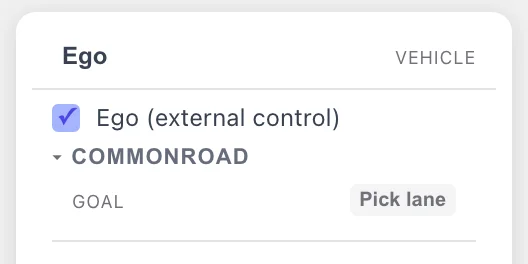
One checkbox. It marks the vehicle as the system under test: the actor a planner (or an external simulator) drives instead of drawtonomy.
The mark is what makes the vehicle the ego everywhere: it becomes the planning problem on export, and it is the actor a replayed solution is applied to. Only one vehicle can carry it.
2. Pick the goal lane
Section titled “2. Pick the goal lane”The COMMONROAD group under the checkbox holds the goal. Press Pick lane and the canvas waits for you to click the lane where the goal starts:
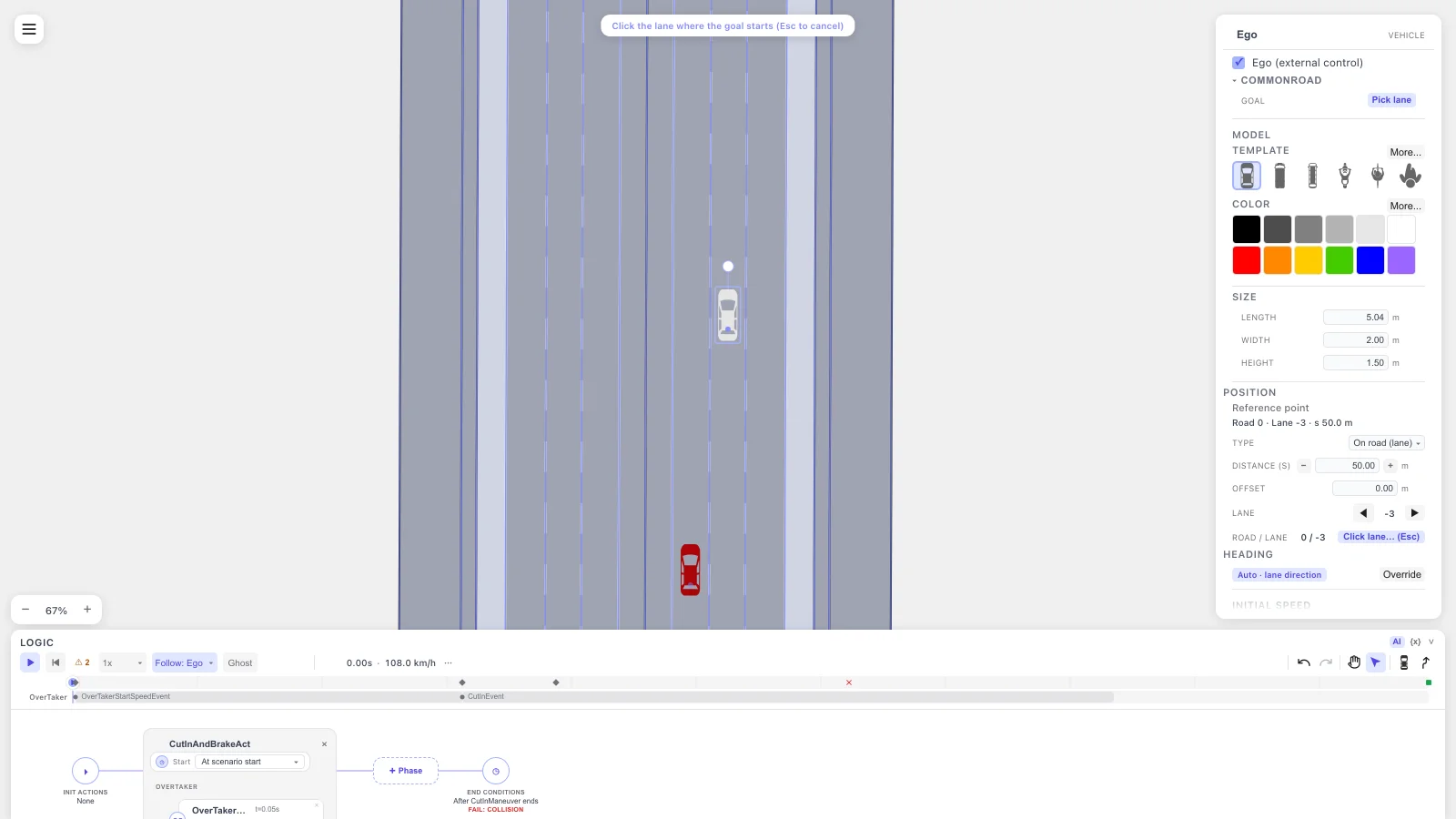
Pick lane arms the canvas. Esc cancels without changing the goal.
Click the lane and a 50 m stretch starting at that point becomes the goal region: highlighted on the canvas, named in the panel:
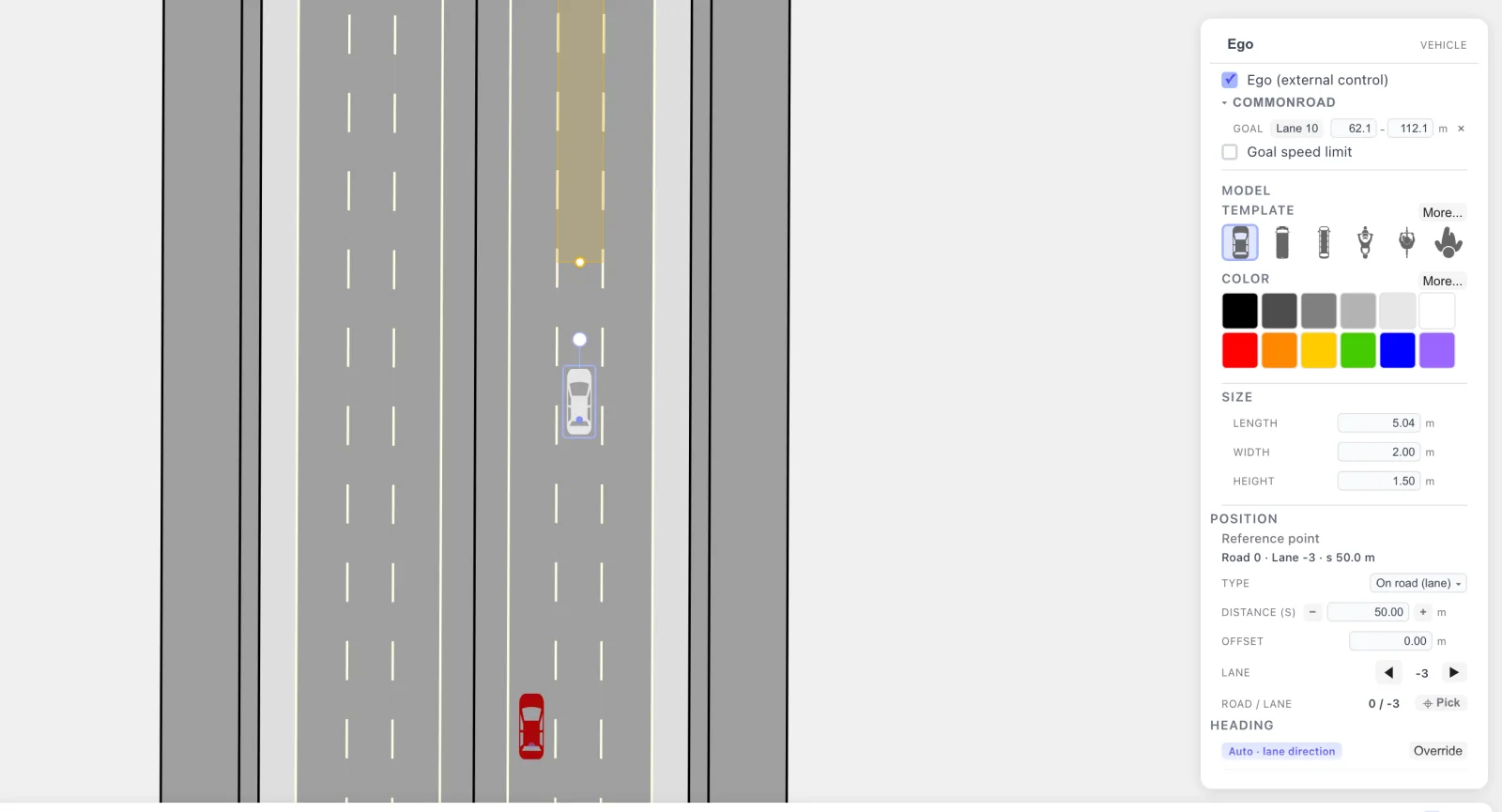
The goal stretch, highlighted on the road and named in the panel. The two numbers next to the lane are its start and end along the lane in metres. The lane name is also the button that picks a different lane; the × clears the goal.
A few things about the goal are worth knowing:
- The range along the lane is adjustable, and it decides what is
written. Pick lane puts down 50 m from the point you clicked. Drag the
handles on the highlighted band, or type the start and end metres into the
two fields (Enter or leaving the field applies, one undo step). The two
follow each other either way: the goal is that stretch (
s0–s1) of the lanelet rather than its whole length. Values are kept inside the lane and at least 2 m apart. A stretch is exported as a<polygon>covering that part of the lane, not as a lanelet reference. Setting the range to the whole lane (0 to its length) removes the range, and the goal is exported as<lanelet ref>. A lane of 50 m or less becomes the goal as a whole from the start, so it is exported as<lanelet ref>too. - A goal speed interval is optional. Tick Goal speed limit under the
goal lane and the export writes
<velocity><intervalStart>0</intervalStart><intervalEnd>v</intervalEnd>, which is how you say “reach the goal at v or slower” (set v to 0 for “and be stopped”). - The time window and heading are optional too. Tick Goal time and
type the window in seconds; the export writes it in time steps
(
round(t / dt), so 4.3 s at dt 0.1 is step 43). Tick Goal heading and type the allowed heading range in degrees (counterclockwise from +x, as in CommonRoad); the export writes it in radians. Ticking Goal heading starts from the goal lane’s direction ±15°. Together with the speed limit this is how you say “stop within 6 s, facing along the lane”. An imported file shows its own time window (and heading, if the file has one) already ticked; unticking leaves the file’s value as it is.
The ego does not drive to the goal during playback. The goal is a constraint handed to the planner, not a path.
Goal criteria
Section titled “Goal criteria”A CommonRoad goalState can carry up to four kinds of constraint. The
panel edits all four; whatever you leave alone is written back unchanged.
| Criterion | Editable in the panel | On import (no edit) |
|---|---|---|
| Position (lanelet reference) | Yes: the whole lane. Pick lane on a lane of 50 m or less, or set the range to 0 to the lane’s length | Kept verbatim |
| Position (a stretch of a lane) | Yes: Pick lane on a longer lane (50 m by default) and the s0–s1 range fields. Written as a <polygon> | |
| Position (rectangle, circle or polygon in the file) | No (picking a lane replaces it) | Kept verbatim |
| Velocity | Yes: the Goal speed limit checkbox writes [0, v] | Kept verbatim if unchanged |
| Time | Yes: Goal time, in seconds, written as integer time steps | Kept verbatim if unchanged |
| Orientation | Yes: Goal heading, in degrees, written in radians | Kept verbatim if unchanged |
Each edit replaces only its own element. Picking a goal lane replaces the
position and nothing else; changing the time window changes only the two
numbers inside <time>; adding a heading adds one <orientation> element.
Everything you did not touch stays exactly as the file declared it, because
it defines the problem a planner has to solve. The export toast says which
interval was replaced.
What determines whether picking a lane keeps or replaces the original
position:
- A file with a lanelet goal: picking the same lanelet (or the same
set of lanelets, for a multi-reference goal) keeps the position verbatim.
This holds even when the panel shows a stretch on that lanelet: the file’s
<lanelet ref>is written back, and the stretch is not. Picking a different lane replaces only the position, with a<polygon>for a stretch (the toast says so) or a<lanelet ref>for the whole lane; the time, orientation and velocity intervals are kept. - A file with a rectangle, circle or polygon goal: the range you see on
import is the lane and stretch drawtonomy derived from that shape. Leaving
it untouched re-exports the original shape verbatim. Picking a lane, or
changing the range, replaces the position and drops the original shape:
a stretch is written as a
<polygon>, the whole lane as a<lanelet ref>. - A file with no position constraint: picking a lane adds one; there is nothing to drop.
Only the first planningProblem in a file is editable. A second one (a
cooperative scenario) is carried through unchanged and drawn read-only: a
purple ring with an arrow at its initial position and heading, labeled with
its id, and its goal (lanelets or region) outlined in dashed purple. It cannot
be selected or moved. Picking a lane, or changing the speed limit, time window
or heading, edits the first goalState only; any further goalStates
(alternative goals) are carried through unchanged, and the notice tells you
how many were kept.
Open an existing OpenSCENARIO file and export it as CommonRoad
Section titled “Open an existing OpenSCENARIO file and export it as CommonRoad”You do not have to draw the scene. A .xosc you already own becomes a
CommonRoad scenario through the same two prerequisites.
-
Open the OpenSCENARIO file. Drop the
.xoscand its.xodron the canvas together, or pick the.xoscin Import… and the.xodrwhen prompted. The road network becomes lanes and every actor becomes a vehicle with its trajectory. Full steps: Open and play a .xosc. -
Open it straight from GitHub instead, with no download: append the file’s GitHub URL to
?open=. The.xodrand catalogs next to it are resolved relative to that URL.https://drawtonomy.com/?open=https://github.com/esmini/esmini/blob/master/resources/xosc/cut-in.xosc -
Play it once. Trajectories come from a recorded run, so the export needs one. Without it the file has the other vehicles’ initial states but no trajectories, and the export says so.
-
Mark the ego and pick a goal lane, as above. An OpenSCENARIO ego is not automatically a CommonRoad planning problem: CommonRoad needs the goal too, and only you know which lane it is.
-
Export ▸
CommonRoad (.xml).
What crosses over: the road network as lanelets, each actor as a
dynamicObstacle with the trajectory it drove, the ego’s initial state, and
the goal lane you picked. What does not: the OpenSCENARIO storyboard itself.
CommonRoad has no triggers or actions, so the scenario a planner receives is
the outcome of your story, sampled at dt = 0.1 s, not the story.
Time mapping
Section titled “Time mapping”OpenSCENARIO time is continuous seconds; CommonRoad time is a discrete, 0-indexed step count. Each direction maps between the two the same way:
| Direction | Rule |
|---|---|
| Import (CommonRoad → scenario) | step k becomes t = k · dt, where dt is the file’s timeStepSize |
| Playback | drawtonomy replays at a fixed 0.05 s internal step regardless of the file’s dt |
| Stop condition | the scenario’s SimulationTimeCondition is set to (last step) · dt + 1 second, one second past the last obstacle or goal-interval step, so playback does not time out before the trajectories finish |
| Export (scenario → CommonRoad) | the recorded run is resampled onto a fixed dt grid (0.1 s unless the file you opened declared another timeStepSize); lastTimeStep = floor(durationSec / dt) |
| Solution (planner’s answer) | step k becomes t = k · dt, same as import. drawtonomy does not renumber the file: a solution that starts at step 1 plays back exactly as numbered, it is not shifted to start at 0. The state at t = 0 comes from the planningProblem’s initialState, so a 1-based solution plays as one continuous trajectory from the initial state. The official checker still rejects such a solution: starts_at_correct_state expects the first state to be the initial state at step 0. So loading a solution that does not start at the initial state shows an amber notice that stays until you close it, for example Solution does not start at the planning problem's initial state (expected time_step=0, received 1). The official checker (valid_solution) rejects it. |
dt itself is never edited in the canvas: an opened file keeps its own
timeStepSize for both playback and re-export.
The verdict sidecar’s
timeSteps are also 0-indexed; a step’s time in seconds is
step × dt, using the same dt as the scenario it judges.
Obstacles that appear and disappear
Section titled “Obstacles that appear and disappear”Every other vehicle in the scene becomes a dynamicObstacle with its
recorded trajectory. If an actor only exists for part of the scenario (added
at t = 4 s by an Add Entity action in the storyboard, removed by a
Delete Entity), the export writes exactly that interval as the
obstacle’s [initial, final] time steps, and outside it the obstacle does
not exist. Playback matches: the vehicle is not on the canvas before it is
added or after it is deleted. A planner reading the file therefore sees an
obstacle that ends, not one that keeps driving past the end of its recording.
Lanelet connectivity
Section titled “Lanelet connectivity”Each lane you drew becomes one lanelet, however long it is; the export does
not split a lane into a chain of shorter lanelets. adjacentLeft /
adjacentRight are written for lanes that sit side by side, and
successor / predecessor only where one lane’s end actually meets the
next lane’s start (both corners of the boundary, within 5 cm). A scene of
parallel through-lanes therefore exports with adjacency but with no
successor or predecessor at all.
Straight lanelets have only two vertices
Section titled “Straight lanelets have only two vertices”A boundary is exported with as many points as the drawn lane has. A straight
lane needs two, so leftBound / rightBound / centerVertices each get
exactly two vertices, however long the lanelet is. Points are not inflated to
a fixed spacing: a 120 m straight is two vertices 120 m apart.
Export
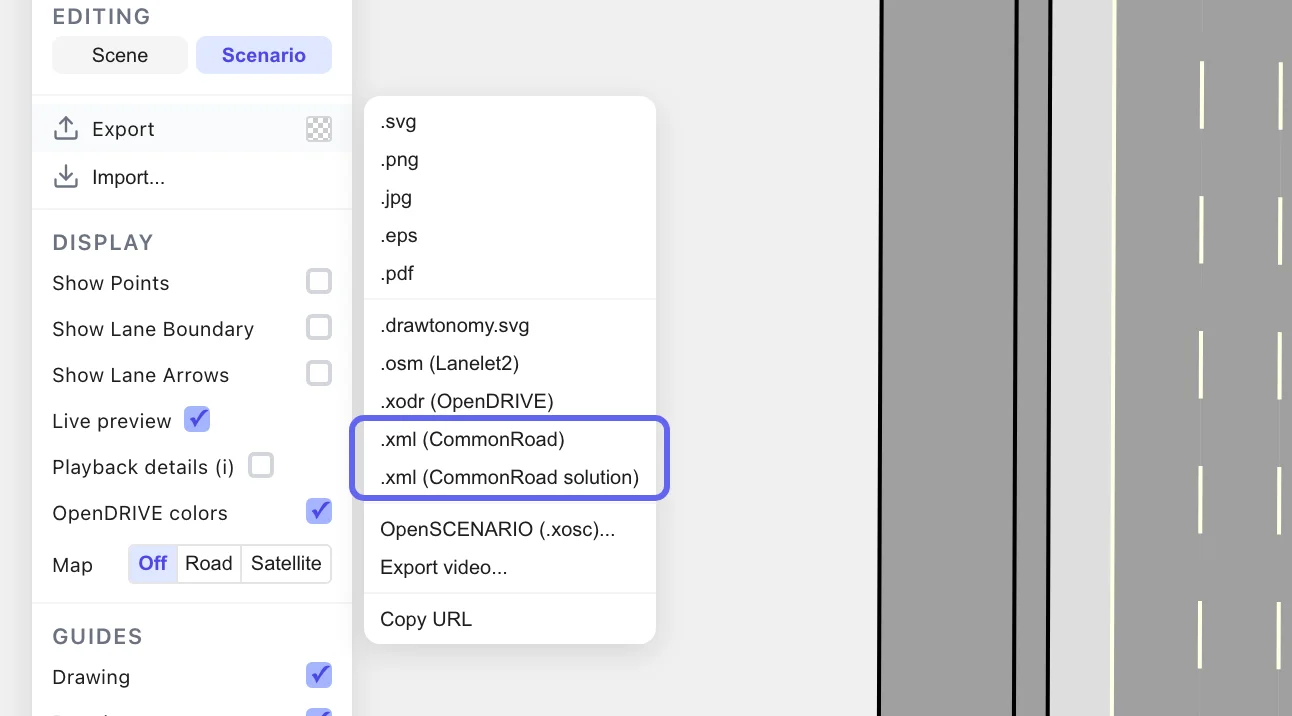
Section titled “Export”Both CommonRoad entries live in the same Export submenu:
| Entry | What it writes |
|---|---|
CommonRoad (.xml) | the scenario: lanelets, dynamicObstacle trajectories, and the planningProblem for your ego. This is the file your planner reads. |
CommonRoad solution (.xml) | a solution: whatever the ego on your canvas is doing right now, written as a CommonRoadSolution. See the four cases below. |
What the solution export writes
Section titled “What the solution export writes”The rule is one line: it writes the ego you can see on the canvas. A toast right after the export says which of these four it was.
| What the ego is doing | What you get |
|---|---|
| Replaying a solution you loaded, and you have not touched the ego | that solution file, byte for byte. The model stays KS (or whatever it was), and so do its time origin, numbers and formatting. |
| Replaying a planning trace you loaded, and you have not touched the ego | the trace’s ego states as a point-mass (pmTrajectory) solution. A planning trace is not a solution file, so there is no original to copy. If you loaded the solution file together with the trace and the trace’s solutionFingerprint matches it, you get that solution file byte for byte instead (see Planning trace). |
| Following a path you gave it (Add Path, or a moved start pose or speed) | your trajectory as a point-mass solution. Your own edit wins over a loaded solution. |
| Standing still at its initial state, with no solution loaded | a standstill solution: every state at the initial position with zero velocity. drawtonomy writes it rather than refusing, but the official checker accepts it only if the ego’s initial speed is within 2.0 m/s of zero. When the initial speed is higher, the official checker rejects the file (starts_at_correct_state allows 2.0 m/s of velocity difference), so it is only a placeholder, and the toast says so, for example The official checker (valid_solution) rejects it (expected velocity=4.0143, received 0), so it is only a placeholder. The toast also offers the two ways to move the ego: add a path, or drop a solution file. |
The benchmark_id starts with PM<n>, where n is the VehicleType closest in
length and width to the ego you drew (1 to 3). A checker builds the ego’s box
from that number, so it matters that it matches your vehicle.
One thing will stop the export, with one line saying where to fix it: no ego, or no goal lane, the two prerequisites above.
A scenario export with no recording still works, but says so: it writes the
other vehicles’ initial states without their trajectories
(Play the scenario first to include NPC trajectories). Play once and
export again for the full file.
- Bring your own planner: the loop from this file to a replayed solution and a verdict.
- Verdict reference: what the official checker tests and how to read its answer.
- CommonRoad overview: what the whole integration covers, and its status.