Planning trace for motion planner debugging (advanced)
Dieser Inhalt ist noch nicht in deiner Sprache verfügbar.
A CommonRoad solution stores one trajectory: the path the ego actually drove. A cyclic planner computes a new trajectory every replanning cycle, each looking seconds ahead, and executes a fraction of a second of it before replanning.
A planning trace keeps those cycles, and keeps the answer too. One file
holds both driven (the states the ego actually drove) and plans (what the
planner intended at each cycle), which makes it self-contained: drop it alone
and the whole run replays.
Only the planner’s author can write one, because the per-cycle trajectories exist nowhere but inside the planner’s loop. That is why it is a library, not a command.
Writing one
Section titled “Writing one”from drawtonomy_cr.trace import TraceWriter
w = TraceWriter(dt=0.1, vehicle=dict(length=4.5, width=1.8, refToCenter=1.4, type="BMW_320i"))for cycle in my_planner_loop(): w.plan(t=cycle.t, states=cycle.trajectory) # one entry per replanning cyclew.driven(executed_states) # what the ego actually drovew.write("solution.planning-trace.json", solution="solution.xml")states takes commonroad-io State objects and plain
{"x":, "y":, "orientation":, "v":, "time_step":} dicts alike.
write() verifies two identities before writing anything: driven matches
the solution’s trajectory within 1e-6 m, and each plan’s executed head
matches driven at the same time steps. A mismatch raises instead of
writing a trace that would replay differently from the solution it claims to
describe.
TraceWriter arguments
Section titled “TraceWriter arguments”| Argument | Required | Meaning |
|---|---|---|
dt | yes | The scenario’s time step in seconds, finite and > 0. Used to convert a state’s time_step into the file’s seconds. |
vehicle | no | The body the planner planned with, as {"length":, "width":, "refToCenter":, "type":}. A CommonRoad planning problem carries no ego shape, so without this drawtonomy draws and checks the authored box instead of the one the official checker judged. |
scenario | no | Scenario identifier, e.g. str(scenario.scenario_id). Used to pair the trace with the scene. |
producer | no | {"name":, "version":}. Informational only. |
role | defaults to "ego" | Which actor the track belongs to, by role. |
name | no | Which actor the track belongs to, by entity name. Give exactly one of role / name; pass role=None when you use name. |
frame | defaults to "center" | What the positions mean: "center" (the vehicle body centre, which is what CommonRoad’s position means) or "ref" (the reference point, the centre of the rear axle). |
write(path, solution=None, replanning_frequency=1, verbose=True):
solution (a path, a Solution object, or a state list) enables the
driven-matches-the-solution check; replanning_frequency is how many
leading states of each plan were actually executed, and therefore how many
are compared against driven; verbose prints the one PASS / FAIL line per
check.
refToCenter
Section titled “refToCenter”The distance in metres from the reference point (the centre of the rear
axle) to the body centre, measured along the heading. It is a property of
the body, not of frame: frame says what the coordinates in the file mean,
while refToCenter is the offset drawtonomy uses to convert between the two,
so the drawn body centre lands exactly on the file’s positions.
It must be 0 or greater, and a negative value is refused. The example’s
1.4 is a real car’s value (BMW_320i is 1.4227170936); take yours from your
planner’s own vehicle parameters, where commonroad-vehicle-models calls it
wb_rear_axle. Omit the field and drawtonomy falls back to the authored
vehicle’s own offset.
The file it writes
Section titled “The file it writes”{ "schema": "drawtonomy-planning-trace-v1", "scenario": "ZAM_Untitled202609011139-1_1_T-1", "producer": { "name": "my_planner", "version": "0.1" }, "frame": "center", "tracks": [ { "role": "ego", "vehicle": { "length": 4.508, "width": 1.61, "refToCenter": 1.4227170936, "type": "BMW_320i" }, "driven": [ { "t": 0.0, "x": 8.18, "y": 51.37, "h": 1.567, "v": 30.0 }, { "t": 0.1, "x": 8.19, "y": 54.37, "h": 1.567, "v": 30.0 } ], "plans": [ { "t": 0.0, "states": [ { "t": 0.0, "x": 8.18, "y": 51.37, "h": 1.567, "v": 30.0 }, { "t": 0.1, "x": 8.19, "y": 54.37, "h": 1.567, "v": 30.0 } ] } ] } ]}| Field | Required | Meaning |
|---|---|---|
schema | yes | Exactly "drawtonomy-planning-trace-v1". Any other value is refused. |
frame | yes | "center" or "ref", as above. |
tracks | yes | One entry per actor, at least one. |
scenario | no | Scenario identifier this trace was computed for. |
producer | no | Free-form, informational. |
tracks[].role / tracks[].name | exactly one | Which actor the track belongs to. |
tracks[].driven | yes | The states the actor actually drove, ascending in t. |
tracks[].plans | yes | The plans the planner issued, at least one. |
tracks[].vehicle | no | length / width in metres (both required when vehicle is present, both > 0), optional refToCenter and type. |
plans[].t | yes | Seconds at which the plan was issued. Must equal states[0].t within 1e-6. |
plans[].states[] | yes | t (seconds), x, y (metres, ENU with Y up), optional h (radians, counter-clockwise, 0 = +x) and v (m/s). |
Two things to note against the verdict sidecar, which is the other file in
this exchange: a trace’s times are seconds, not the sidecar’s integer
time steps, and the heading key is h, not orientation. Unknown keys are
ignored.
Loading one
Section titled “Loading one”Same as a solution: drop it on the canvas, pick it in Import…, or point
&trace= at it in the URL. drawtonomy-cr open picks it up automatically
when it is named <solution stem>.planning-trace.json next to the solution.
When both a solution and a trace are given, the trace wins. They are
both a replay of the same run, so only one can drive the ego, and the trace
is the solution plus more (its driven states are the solution’s
trajectory). The solution is not thrown away: when the trace’s
solutionFingerprint matches it, drawtonomy keeps the solution file and
Export solution returns it byte for byte (still KS, still your file
name), exactly as if you had loaded the solution alone. When the fingerprint
differs, or the trace has none, a single line says so, and Export solution
rebuilds a PM solution from the trace instead.
What it shows
Section titled “What it shows”During replay the ego moves along driven, exactly as it would from a
solution. What the trace adds is the planned trajectory on the road: at
each instant, the plan the planner was holding then, which is the latest plan
issued at or before the playhead, sliced forward from the playhead.
So you see where the planner thought it would be several seconds ahead, and the moment it changed its mind about that. Before the first plan’s time, nothing is drawn for that actor.
How to read the green ribbon
Section titled “How to read the green ribbon”The ribbon carries two things beyond its shape.
- Shade is acceleration by default, and can be switched to speed. Darker green is the slower side of whichever quantity you picked — braking in acceleration mode, low speed in speed mode — and lighter green is the faster side. In acceleration mode a steady speed stays at the base green. Click the Trajectory toggle to open its panel and pick Accel or Speed under Shade.
- Opacity is time. The ribbon fades toward the far end, so the part nearest the vehicle is the near future and the faint end is the horizon.
The first bar is the same in both modes — only what it measures changes.
Auto and fixed scales
Section titled “Auto and fixed scales”The same panel decides what counts as full shade, under Scale.
- Auto (the default) uses the range measured in the trajectory you are looking at, so the whole colour range is always in use. A stretch that reads as dark is the hardest braking — or the slowest point — in that run, not a fixed number. Comparing shades across two different runs therefore does not compare values.
- Fixed pins the end of the scale to a number you choose (km/h for speed, m/s² for acceleration), so the same colour means the same value in every screenshot. Use it when you are comparing runs side by side. The cost is that a city-speed run under a 180 km/h scale only reaches the dark end of the range and looks nearly uniform.
The Trajectory toggle’s tooltip shows these same bars, labelled for the mode that is currently in effect, so the encoding is readable without leaving the canvas. The choice is remembered between sessions and is used by the canvas, the 3D view, and every export.
Candidate trajectories
Section titled “Candidate trajectories”A sampling planner computes many trajectories every cycle, scores them, and
drives one. If your trace records that set in plans[].candidates, a
Candidates toggle appears next to Trajectory and draws the whole fan: the
alternatives the planner considered and rejected, not just the one it kept.
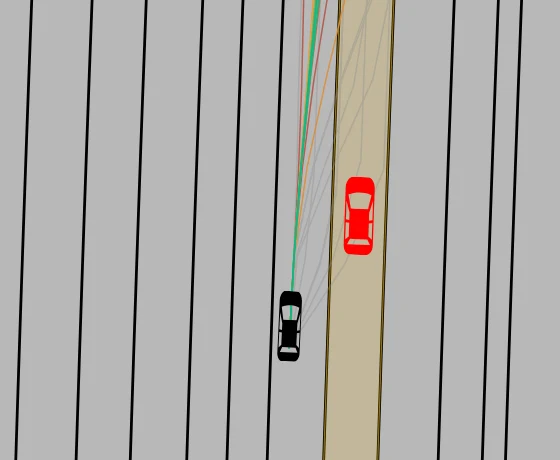
One cycle of commonroad-reactive-planner, at the moment the red vehicle is
alongside the ego. The best candidates (green) steer left, clear of it; the
worse-ranked feasible ones (amber, red) drift back toward its lane; the
rejected ones (grey) fan out over and past it. Every candidate leaves the
vehicle at the same point, because they were all sampled from the same state.
The toggle only appears when the loaded trace actually carries candidates, and it starts off, so a trace without them changes nothing on the canvas. It is independent of Trajectory: either can be on without the other.
Open the real planner sample, then turn on Candidates to inspect 20 feasible and 10 rejected trajectories per replanning cycle.

Colour is the rank, not the cost. Each candidate is one thin line coloured
by its position in the candidates array, best first, through eight steps:
Reading the rank rather than the cost means two files written by planners with different cost scales read the same way, and a planner that cannot report a cost at all still gets a usable picture as long as it writes its candidates in its own order of preference. The same bar is in the Candidates tooltip, so the encoding is readable without leaving the canvas.
The chosen plan keeps its green ribbon on top, so “what it picked” stays separate from “what it looked at”. Candidates are drawn for the cycle that was current at the playhead, as the planner saw it when it issued that cycle, and they are not included in video or image exports.
To write them, pass candidates= to TraceWriter.plan(); the
format reference
has the field table and the size guidance (candidates are by far the largest
thing in a trace, and the writer can thin them with candidate_stride, which
keeps every state by default).
A checker verdict pairs with a trace through the trace’s solutionFingerprint,
the same way it pairs with a solution replay. Traces written by
drawtonomy-commonroad 0.3 or later carry that fingerprint, so a trace and its
verdict load as verified and the official checks join the RUN result. Traces
without a solution fingerprint still load, but the verdict stays on the
unchecked CHECK ? path.
The planned trajectory is part of the picture, so exporting keeps it. Export video… writes it into every frame the same way it appears on the canvas: under the vehicles, sliced forward from that frame’s time. Image exports (PNG, JPEG, SVG, EPS, PDF) include the trajectory as it is shown at the current playback time. Open the Trajectory panel and press OFF before exporting if you want an image or video without it.
- Bring your own planner:
where
TraceWriterfits in the loop. - Verdict reference: the official checks, which are unaffected by the trace.