
Triggers reference — all 19 scenario conditions
本頁內容尚未翻譯。
A TRIGGER decides when an event’s actions start. drawtonomy offers 19 conditions in the trigger dropdown, plus a handful more behind Advanced….
Eight conditions sit under COMMON. The remaining eleven are behind a collapsed More conditions… row — click it to expand.
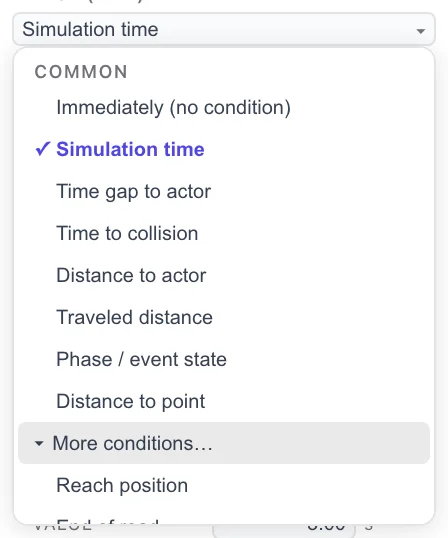
New events start with Simulation time at 0.00 s.
COMMON
Section titled “COMMON”| UI label | OpenSCENARIO | Fires when |
|---|---|---|
| Immediately (no condition) | (no condition) | Straight away. Only offered as the first condition of a trigger, and never on END CONDITIONS. |
| Simulation time | SimulationTimeCondition | The run reaches a given number of seconds. |
| Time gap to actor | TimeHeadwayCondition | The headway to another actor crosses a threshold, in seconds. |
| Time to collision | TimeToCollisionCondition | The projected time to collision with another actor crosses a threshold. |
| Distance to actor | RelativeDistanceCondition | The distance to another actor crosses a threshold, in metres. |
| Traveled distance | TraveledDistanceCondition | The actor has driven a given distance since the run started. |
| Phase / event state | StoryboardElementStateCondition | A named phase or event starts, is running, ends, or is complete. |
| Distance to point | DistanceCondition | The distance from the actor to a fixed point crosses a threshold. Monitors distance continuously. |
More conditions…
Section titled “More conditions…”| UI label | OpenSCENARIO | Fires when |
|---|---|---|
| Reach position | ReachPositionCondition | The actor comes within a tolerance radius of a point. An arrival test rather than a distance monitor. |
| End of road | EndOfRoadCondition | The actor has been at the end of the road for a given duration. |
| Actor speed | SpeedCondition | The actor’s own speed crosses a threshold. |
| Relative speed | RelativeSpeedCondition | The actor’s speed relative to another actor crosses a threshold. |
| Stand still | StandStillCondition | The actor has been stationary for a given duration. |
| Actor acceleration | AccelerationCondition | The actor’s acceleration crosses a threshold. |
| Collision | CollisionCondition | The actor collides with another entity. |
| Off-road | OffroadCondition | The actor has been off the drivable surface for a given duration. |
| Scenario parameter | ParameterCondition | A declared parameter compares to a value. |
| Scenario variable | VariableCondition | A declared variable compares to a value. |
| Traffic signal | TrafficSignalCondition | A named signal reaches a given state. |
Advanced conditions
Section titled “Advanced conditions”Some conditions do not appear in the dropdown at all. Click the small Advanced… link under a condition row to reach them:
| UI label | OpenSCENARIO |
|---|---|
| Relative clearance | RelativeClearanceCondition |
| Angle | AngleCondition |
| Relative angle | RelativeAngleCondition |
| Traffic signal controller | TrafficSignalControllerCondition |
| Time of day | TimeOfDayCondition |
| User-defined value | UserDefinedValueCondition |
Combining conditions
Section titled “Combining conditions”A trigger is a set of groups. The editor shows the first group under the heading ALL OF (AND).
- + and adds a condition to the current group. Every condition in
a group must hold at once — the group maps to one OpenSCENARIO
ConditionGroup. - or… starts a new group, shown as Any of (OR). Any single
group being satisfied satisfies the trigger — multiple
ConditionGroupelements are OR-ed by the standard.
So (A and B) or C is two groups: one holding A and B, one holding C.
Common fields
Section titled “Common fields”The fields shown depend on the condition, but these recur:
| Field | Meaning |
|---|---|
| ACTOR | The actor whose state is measured — the triggering entity. |
| REFERENCE ACTOR | The other actor, for conditions that compare two of them. |
| SECONDS | The threshold, for time-based conditions. |
| exceeds / falls below | The comparison rule. Which is the default depends on the condition. |
| DELAY AFTER MET | In the event’s ADVANCED section: hold the event back this many seconds after the condition is satisfied. Maps to Condition@delay. |
See also
Section titled “See also”- Actions reference — what happens once a trigger fires.
- Phases and events — phase Start conditions use the same catalogue.
- End and fail conditions — the same conditions, used to stop a run or fail it.